How to Build an AI Sales Agent That Qualifies Leads While You Sleep
By HL Max18 min read
Imagine never missing a potential customer because you're off the clock. An AI sales agent can handle calls, texts, chats, and social media messages 24/7, qualifying leads and booking appointments while you focus on closing deals. Here's why it matters:
- 82% of consumers expect immediate responses to sales inquiries.
- Responding within 5 minutes makes you 9x more likely to convert a lead.
- Businesses using AI for lead qualification have seen conversion rates jump from 18% to 44%.
This guide walks you through creating an AI sales agent using GoHighLevel. You'll learn how to set up automated prompts, connect phone numbers, sync calendars, and automate follow-ups. By the end, you'll have a system that qualifies leads, organizes data, and schedules appointments - all without human intervention.
Quick Highlights:
- AI agents use natural, two-way conversations to qualify leads.
- They analyze intent and sentiment to prioritize prospects.
- Automating follow-ups reduces 63% of lead drop-offs.
- AI improves efficiency, saving your team time on repetitive tasks.
Let’s dive into how you can set this up step by step.
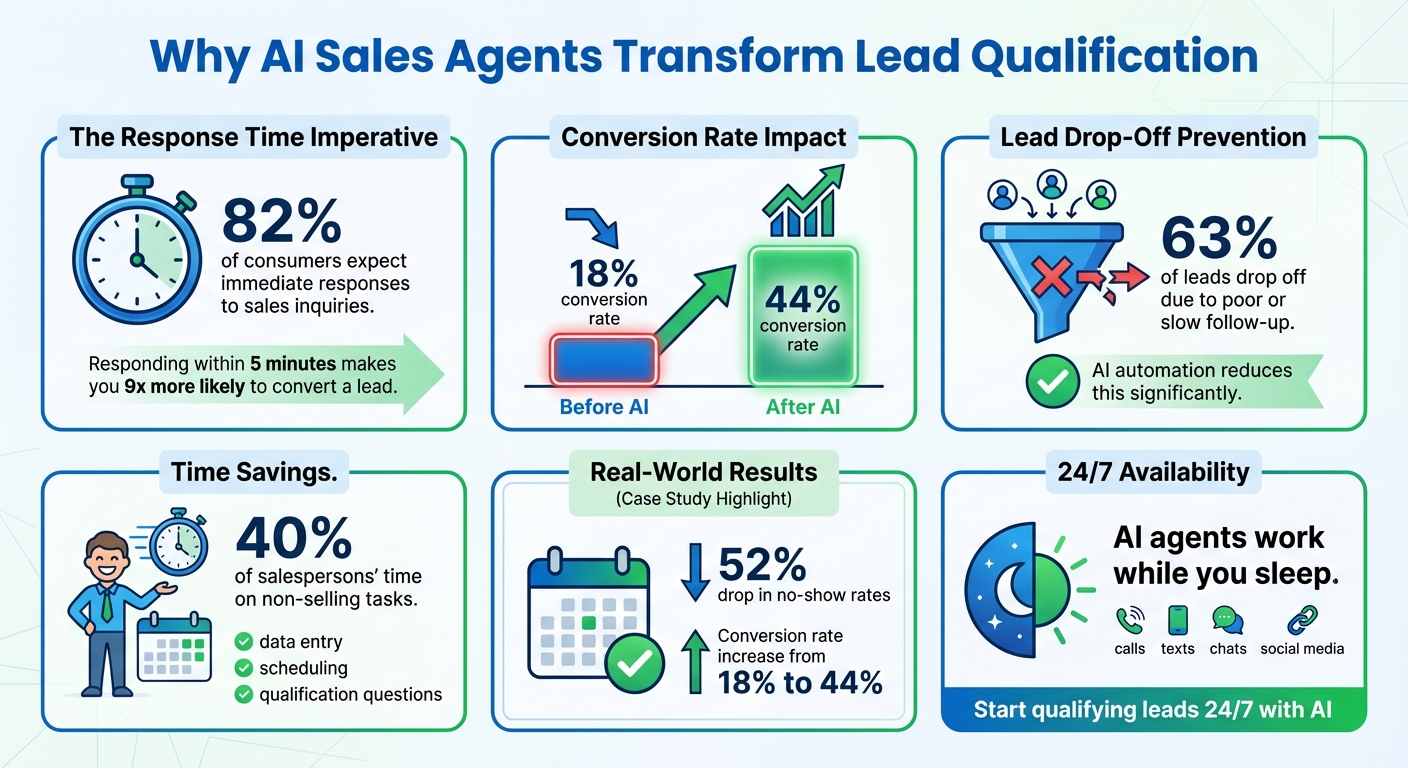
AI Sales Agent Lead Qualification Statistics and Benefits
Build an AI Sales Agent That Makes $50k/Month
sbb-itb-f031672
How AI Handles Lead Qualification
AI sales agents take lead qualification to a whole new level by engaging prospects in natural, two-way conversations that adapt to their responses in real-time. Instead of relying on rigid forms or static tools, these agents ask follow-up questions about key factors like budget, timeline, decision-making authority, and specific needs. This conversational approach gathers essential information without making prospects feel like they're filling out a questionnaire.
Here's where AI stands out: it doesn’t just record responses - it analyzes intent and sentiment using natural language processing. For example, if a prospect says, "I’m interested but need to talk to my partner first", the AI recognizes this as a signal for follow-up rather than immediate action, tagging the lead for nurturing. On the other hand, if someone mentions a budget that meets your threshold, the AI can immediately route them to your calendar. This instant decision-making categorizes leads into groups like "hot", "nurturing", or "not a fit" automatically, saving time and effort.
A great example of this in action is from November 2025, when Top GHL Snapshots implemented a pre-call qualification system using GoHighLevel's Workflow AI. By asking five targeted questions - about business type, budget, timeline, decision-making authority, and challenges - they ensured only leads with budgets over $2,000 were routed to book calls. This approach led to a 52% drop in no-show rates and boosted their sales conversion rate from 18% to 44%.
"The goal of AI isn’t just to reply instantly; it’s to help you identify who is ready to buy, who needs nurturing, and who isn’t a fit, without overwhelming your team." - Hamraj Kumar, Organic Search Marketing & SEO
What Sets AI Sales Agents Apart
AI sales agents outshine basic automation by making real-time decisions based on the context of conversations. They don’t just follow pre-set paths - they can handle objections, answer common questions, and even detect when a prospect is frustrated or showing strong buying intent. When necessary, they escalate the conversation to a human agent.
Their real strength lies in tracking behavioral cues. For instance, if a lead repeatedly visits your pricing page or engages with specific service details, the AI can trigger personalized follow-ups immediately. This level of responsiveness goes far beyond what traditional automation systems can achieve.
Here’s a quick comparison of AI agents and basic automation:
| Feature | Basic Automation | AI Sales Agent |
|---|---|---|
| Response Type | Rigid/Button-based | Natural Language/Conversational |
| Qualification | Static forms | Dynamic questioning |
| Decision Making | Pre-defined paths | Real-time intent analysis |
| CRM Integration | Basic data entry | Smart tagging and sentiment updates |
AI agents also deliver consistent experiences across platforms like Instagram DMs, Facebook Messenger, SMS, and website chat, ensuring every lead gets the same level of attention and care.
Why Lead Qualification Matters
Not all leads are worth pursuing, and without proper qualification, your sales team could waste hours on prospects who aren’t ready to buy, lack decision-making authority, or simply can’t afford your services. Over 63% of leads drop off due to poor or slow follow-up, and salespeople spend nearly 40% of their time on non-selling tasks like data entry and scheduling.
AI solves this by filtering leads before they ever reach your calendar. Only those who meet your criteria - right budget, timeline, and authority - are booked for calls. This ensures your team spends their time on prospects who are genuinely ready to move forward. Plus, responding to leads within five minutes makes you nine times more likely to convert them. AI makes this instant response possible, 24/7.
Benefits of Automated Lead Qualification
One standout advantage of AI-driven lead qualification is its round-the-clock availability. While you’re off the clock, your AI agent is still working - answering inquiries, qualifying leads, and booking appointments. This way, you capture opportunities that might otherwise slip through the cracks.
Another key benefit is the immediate organization of data. Every conversation is transcribed, tagged, and synced with your CRM, complete with the lead’s qualification status, sentiment, and specific needs. This eliminates the need for manual note-taking and ensures no detail is overlooked. These workflows seamlessly connect to the automation setup discussed in later sections, creating a smooth process from qualification to booking.
AI also helps reduce no-show rates and increase conversions. When prospects go through a conversational qualification process before booking, they’re more likely to follow through. The results speak for themselves: the Top GHL Snapshots example showed a 52% drop in no-shows and a jump in conversion rates from 18% to 44%. That’s a direct boost to revenue.
For businesses managing high call volumes or multiple clients, AI qualification allows you to scale without adding more staff. By automating repetitive tasks like asking qualification questions, updating records, and sending confirmations, your team can focus on what they do best - closing deals and delivering exceptional service.
Next, we’ll dive into how to set up your own AI agent in GoHighLevel to bring these benefits to life.
Step 1: Create Your AI Agent in GoHighLevel
Getting your first AI sales agent up and running in GoHighLevel is a simple process, thanks to the platform's user-friendly setup.
Set Up Basic Agent Settings
Start by logging into your GoHighLevel sub-account and heading to Settings > AI Agents. Click on + Create Agent in the top-right corner to open the setup panel.
Here’s what you’ll need to configure:
- Agent Name: This is for internal use, so choose a name that’s easy to identify.
- Business Name: This is what the AI uses to introduce your company to callers.
- Voice Selection: GoHighLevel provides a variety of AI-generated voices. Use the preview feature to find a voice that suits your brand’s personality - think professional for a law firm or upbeat for a fitness studio.
- Initial Greeting Message: This is the first thing your agent says when answering a call. Keep it friendly and straightforward, like: "Hi, you've reached [Business Name], how can I help you today?" The platform automatically replaces the placeholder with your business name.
- Agent Direction: By default, this is set to "Inbound", which is perfect if your agent will primarily handle incoming calls for lead qualification.
"The more specific your prompt, the better your AI sales agent will perform." - Hamraj Kumar, Organic Search Marketing and SEO, HighLevel
These initial settings are crucial for ensuring your AI agent can effectively engage with prospects and support your 24/7 lead capture efforts.
Test Your AI Agent
Before going live, it’s essential to test your AI agent to make sure it’s functioning as expected. GoHighLevel provides a "Test Your Agent" feature directly within the setup process, so you can test without navigating away.
You have two options for testing:
- Web Call: Test directly in your browser.
- Phone Call: Experience the interaction like your prospects would. Enter your phone number and click "Call Me" to hear the agent in action.
Simulate various scenarios during testing - ask about pricing, book an appointment, or mention needing to consult someone else. This helps pinpoint any awkward phrasing or gaps in logic. After testing, review the transcripts in the "Call History" section to identify misunderstandings or unclear responses, and make adjustments as needed.
Once you’ve fine-tuned your agent and ensured smooth interactions, you’re ready to move on to connecting phone numbers and setting up call routing.
Step 2: Connect Phone Numbers and Set Up Call Routing
Now that your AI agent is ready, the next step is to ensure it can seamlessly engage with prospects through your business phone numbers.
Link Phone Numbers to Your AI Agent
To use HighLevel's Voice AI, you'll need to connect either LC Phone or Twilio numbers - external carrier numbers won't work . If your sub-account already uses LC Phone, you're good to go.
Head to Settings > AI Agents, select your agent, and navigate to the Phone and Availability section. From here, assign one or more numbers from your sub-account's available list to your AI agent.
If you want the AI to respond instantly, avoid enabling call forwarding on that number, and don't set it as the default number for your sub-account. However, if you'd prefer the AI to act as a backup for missed calls, enable call forwarding to your office or cell phone. In this setup, the AI will step in when you're unavailable to answer.
Make sure to set the Inbound Call Timeout to 15–20 seconds. If the timeout is too long and the call reaches your personal or carrier voicemail, HighLevel will mark the call as "completed", preventing the AI from stepping in.
Once this is done, adjust your phone settings to ensure smooth lead qualification.
Configure Business Hours and Call Handling
With your phone numbers linked and routing in place, the next step is to customize your AI agent's operating hours to align with your business schedule. This ensures the agent can efficiently handle and qualify leads during the times that matter most.
Under the Phone and Availability section, set your business hours - for example, Monday through Friday from 9:00 AM to 6:00 PM. For after-hours calls, choose whether to send them to voicemail, forward them to another number, or let the AI handle them 24/7. Using Advanced Mode, you can also set up specific call transfer rules. For instance, you might route calls to a live agent if the AI detects frustration or if the caller specifically requests to speak with a specialist.
Finally, test everything by calling your live number. Check that the call routing, timeout settings, and business hours function as expected. Once everything is running smoothly, your AI agent will be ready to qualify leads in real time.
Step 3: Write Qualification Prompts
Once your phone routing is set up, the next step is creating a conversational framework for your AI agent. This is where you shape your brand's voice and establish the criteria to distinguish high-quality leads from unqualified ones. By crafting tailored prompts, you ensure your AI agent communicates consistently while effectively identifying qualified prospects. This approach aligns perfectly with the goal of streamlined, automated lead conversion.
Use Basic Mode for Quick Setup
If you're short on time, Basic Mode is the simplest option. It doesn’t require writing prompts - just select the key data points you want to capture, like name, email, phone number, and issue. The system then automates the conversation flow.
This mode is ideal for straightforward lead capture, where the main focus is collecting contact information and feeding it into your CRM. However, it has limitations. You can’t customize your AI agent’s personality or include advanced qualification logic. For more nuanced lead qualification, Advanced Mode is the better choice.
Use Advanced Mode for Tailored Prompts
For businesses needing to qualify leads based on factors like budget, timeline, or decision-making authority, Advanced Mode offers complete flexibility. You can write detailed instructions to guide your AI agent’s interactions.
Begin by defining your agent's identity and tone. For example:
"You are a polite, professional assistant for a digital marketing agency. Your objective is to qualify leads by gathering information on their current monthly ad spend, their timeline to start, and whether they are the decision-maker."
Once the agent’s identity is established, include specific instructions for handling objections, answering FAQs, and deciding when to escalate the conversation to a human. For instance, if a caller’s budget is below $2,000 per month, the AI could explain your minimum engagement requirements and provide a resource guide instead of scheduling a call.
"The more specific your prompt, the better your AI sales agent will perform." – Hamraj Kumar, SEO and Organic Search Marketing, HighLevel
To ensure your agent performs effectively, test your prompts in various scenarios. Simulate interactions with new leads, frustrated callers, and edge cases like invalid contact details. This will help refine your prompts, ensuring your AI agent stays on-brand and routes leads appropriately. With thorough testing, your system will be ready to handle lead engagement consistently and efficiently.
Step 4: Set Up Automated Appointment Booking
After qualifying leads effectively, the next step is to streamline the process with automated appointment booking. This feature allows your AI agent to instantly schedule meetings, eliminating the hassle of manual scheduling. It ensures that qualified leads can book a time with you anytime - day or night. When a lead is ready to proceed, the AI agent provides available time slots and confirms the meeting in real time.
"One of the most powerful features of the HighLevel Voice AI Agent is the ability to book real-time appointments." – HighLevel
To make this work seamlessly, you'll need to connect your calendar and set clear availability rules. This prevents double-booking and ensures meetings are scheduled efficiently. Fast response times through automated booking can also help secure leads before they turn to competitors.
Connect Your Calendar to GoHighLevel
The first step is syncing your calendar so the AI agent can access your availability. Go to Settings > Calendars in GoHighLevel and either link your Google Calendar or use GoHighLevel's built-in calendar - whichever fits your workflow best.
Once your calendar is connected, navigate to Settings > AI Agents (for voice) or Conversations > AI Settings (for chat). Set the AI agent’s primary goal to "Appointment Booking". This tells the system to focus on securing meetings rather than just collecting lead information. Then, assign the specific calendar the agent should use to offer time slots.
For example, a plumbing and HVAC company in late 2025 used GoHighLevel AI to book emergency appointments after hours. The system qualified jobs by type and location before syncing them to the technician's calendar, significantly improving efficiency.
Now, let’s configure your availability to keep scheduling smooth and conflict-free.
Set Appointment Availability
Defining clear availability ensures the AI agent only books appointments during appropriate times. In the "Phone and Availability" tab or calendar settings, you can specify booking hours. For instance, you might allow appointments Monday through Friday from 9:00 AM to 5:00 PM EST, while blocking weekends.
To avoid back-to-back meetings, set 10–15 minute buffers between appointments.
You can also set up automated reminders. Configure workflows to send instant SMS or email confirmations as soon as an appointment is booked. Follow up with reminders 24 hours and 1 hour before the meeting. Using multi-step reminders can reduce no-show rates by 40–60%. Including a "Reply YES to confirm" option in your reminders helps verify attendance and further minimizes missed meetings.
If you’re managing a team, enable round-robin distribution to assign leads to the next available team member. This ensures an even workload and keeps everyone productive. The system automatically detects the lead’s time zone, so all availability is displayed in their local time - avoiding confusion for leads in different states or countries.
Step 5: Automate Follow-Up After Calls
Automating follow-ups after calls is the final step in ensuring effective lead conversion. Without it, over 63% of leads are lost due to delayed or insufficient responses. With GoHighLevel workflows, follow-ups happen instantly based on the outcome of each call. Whether a lead is ready to move forward, needs more details, or isn’t a match, the system handles it all without any manual effort.
Quick responses make a huge difference - studies show they significantly boost conversion rates. Your AI agent can send a text or email right away, update the contact’s record with call details, and notify your team if immediate action is required. This automation eliminates repetitive tasks that can take up 40% of a salesperson’s time. The next step? Set up workflow triggers to kick off these follow-up actions.
Setting Up Workflow Triggers for Follow-Up
To automate follow-ups, create a workflow (Automations > Workflows) and set it to trigger when a call ends (e.g., "Call Ended" or "AI Agent Completed Call"). This ensures follow-up actions happen instantly.
Here are some actions to include in your workflow:
- Send SMS or Email: Send an immediate follow-up message tailored to the situation. For instance, if the AI agent qualifies a lead but they haven’t booked an appointment, you could send: "Thanks for chatting! Here’s a link to schedule a time that works for you: [booking link]." If the lead isn’t qualified, share a helpful resource and tag them for a nurture sequence.
- Update Contact Fields and Tags: Organize leads by updating their status - move them from "New Lead" to "Qualified" or "Nurture Needed", depending on the call outcome. Use tags like "Hot Lead", "Info Seeker," or "Not a Fit" to segment leads and set up targeted follow-ups.
- If/Else Branching: Create custom follow-up paths. For example, if the AI detects a budget over $2,000, notify your sales team via Slack. If the budget is lower, add the lead to a longer-term email sequence.
Once your workflow is set up, double-check that all call data is being captured and stored accurately.
Capturing and Storing Lead Data
Every call provides valuable insights - details like the lead’s name, email, budget, timeline, and specific needs. Add an "Update Contact Fields" action to your workflow to save this information directly into your CRM.
Use tags to categorize leads for better organization. High-priority leads can be flagged for immediate attention, while less urgent prospects are added to a nurture campaign. To ensure no important lead gets overlooked, set up internal notifications (via email or Slack) to alert your team when a high-priority tag is applied.
Track and Improve Your AI Agent's Performance
Once you've set up automated follow-ups, the next step is to keep a close eye on your AI agent's performance and make continuous adjustments. Building your AI agent is just the beginning - it's a process that demands regular tracking and data-driven improvements to maintain strong lead conversion rates. Surprisingly, only 56% of companies actively use AI for performance insights. Platforms like GoHighLevel make this easier by consolidating all your AI performance data into a single dashboard. This gives you a clear view of what’s working and where adjustments are needed.
Some of the key metrics to focus on include lead response time (which AI can reduce from hours to just seconds), follow-up completion rates, and how conversions improve at different stages of your sales funnel. Additionally, track how much time your team saves by letting AI handle repetitive tasks - research shows that nearly 40% of a salesperson's time is spent on non-selling activities. GoHighLevel also provides AI-driven insights that automatically detect funnel drop-offs, assess lead quality, and predict conversion chances based on past data. To stay on top of performance, you can set up automated weekly reports, eliminating the need for manual reviews.
Review Call Transcripts and Data
Every call generates a transcript, recording, and summary that captures details like duration, intent, and outcomes. Reviewing these transcripts and workflow logs is essential to ensure your AI agent is accurately capturing lead details and triggering the right follow-up actions. Pay attention to patterns, especially when the agent encounters unexpected questions or unclear responses.
Calls where the agent has to re-ask questions, escalate issues, or process incorrect information can highlight areas where your prompts might need fine-tuning. These insights are invaluable for making targeted improvements to your AI agent.
Refine Your Agent Over Time
Once you've pinpointed areas that need adjustment, refine your prompts and workflows accordingly. For instance, if you're using Basic Mode and notice the agent struggles with handling specific objections, consider switching to Advanced Mode. This allows you to write more detailed instructions for those scenarios. Use If/Else branching in workflows to guide leads more effectively based on their responses. Before making changes live, test them in the "Test Your Agent" panel to ensure they work as intended. Run multiple test calls to confirm consistent performance. Regularly reviewing performance - ideally on a weekly basis - will help you make incremental improvements based on the data you gather.
As Hamraj Kumar, Organic Search Marketing and SEO expert at HighLevel, puts it:
"The magic still happens when a human looks at those insights and says, 'Here's what we'll do next.'"
Conclusion
Creating an AI sales agent that qualifies leads around the clock might feel overwhelming at first, but breaking it down into six clear steps in GoHighLevel makes it much more manageable. These steps - building your agent, linking phone numbers, crafting qualification prompts, automating bookings, setting up follow-up workflows, and monitoring performance - work together to form a system that captures, qualifies, and converts leads without needing constant human intervention. The result? A smoother process and measurable improvements for your business.
And the numbers back it up: businesses using AI for lead qualification have reported conversion rates climbing from 18% to 44%, no-show rates dropping by 52%, and response times shrinking from hours to mere seconds. That’s revenue recovered that would otherwise be lost.
GoHighLevel simplifies the entire process by combining everything into one platform. You won't need to juggle separate tools for CRM, calendars, SMS, or AI. Instead, your AI agent seamlessly works with your contact records, workflows, and booking system - no extra integrations or clunky setups required. This unified approach allows you to act quickly and efficiently.
Start small: create one funnel and a basic workflow. Run tests, review transcripts, and tweak your prompts as you go. The system improves with use, and the time you invest upfront will pay off as your lead volume grows.
If you're ready to stop missing opportunities and automate lead qualification 24/7, GoHighLevel offers a 14-day free trial to get started. Set up your first AI agent, test it with real leads, and see the difference it can make. The sooner you dive in, the sooner you’ll reclaim lost opportunities and let your team focus on closing deals instead of chasing cold leads.
FAQs
How does an AI sales agent understand customer needs and emotions?
An AI sales agent leverages advanced natural language processing (NLP) to interpret and respond to customer interactions - whether through calls, chats, or form submissions. Here's how it works:
- Intent detection: By analyzing keywords, patterns, and context, the AI pinpoints the customer's goal - like requesting a product demo or inquiring about pricing. This insight helps the system decide whether to qualify the lead, redirect the conversation, or bring in a human sales representative.
- Sentiment analysis: The AI gauges the emotional tone of the interaction, identifying whether the customer is positive, neutral, or frustrated. For voice interactions, it even picks up on vocal nuances, such as tone and pacing, to get a better read on how the customer feels.
By combining these capabilities, the AI can automatically qualify leads, prioritize follow-ups, and manage leads around the clock. The result? A seamless and personalized experience that keeps customers engaged and ensures no opportunity slips through the cracks.
What are the main advantages of using AI to qualify leads?
Using AI for lead qualification can bring a whole new level of efficiency to your sales process. With AI, you can automate lead screening and engagement around the clock, so no potential leads slip through the cracks - even after business hours. Plus, faster response times mean you can connect with prospects more quickly, which can have a direct impact on your conversion rates.
Another advantage? Your team gets to focus on higher-priority tasks instead of spending time on repetitive follow-ups. This shift not only boosts productivity but also ensures that your sales efforts are directed where they matter most. By simplifying the lead qualification process, AI minimizes delays and missed opportunities, helping your business run more smoothly and effectively.
How can I make sure my AI sales agent gets better over time?
To keep your AI sales agent performing at its best, think of it as a dynamic part of your sales strategy, not a “set it and forget it” tool. Regular tweaks and feedback are essential to fine-tune its capabilities.
Start by analyzing interaction data - look at lead details, conversation outcomes, and sentiment trends. This helps pinpoint areas that need attention. Keep an eye on key metrics like lead qualification rates, appointment conversions, and response accuracy to measure its effectiveness. When low-confidence interactions or mistakes occur, route them to a human reviewer. Once corrected, feed those responses back into the system to improve future performance.
Make a habit of updating prompts, retraining the model with fresh data, and experimenting with workflow variations to discover what resonates most with your audience. Tools like HighLevel’s Agent Studio can help you stay ahead, ensuring your AI agent evolves alongside your business and consistently delivers stronger results.