How to Stop Leads From Falling Through the Cracks (Without Hiring More Staff)
By HL Max16 min read
Slow response times are costing you leads. Research shows that responding to leads within 5 minutes makes them 21x more likely to convert, yet most businesses take hours - or even days. The problem isn’t your team size; it’s fragmented systems and manual processes that delay follow-ups.
Here’s the fix: automation. Tools like GoHighLevel centralize lead management, automate follow-ups, and eliminate repetitive tasks. This means faster responses, fewer missed opportunities, and more time for your team to focus on closing deals.
Key Takeaways:
- Automation boosts conversions: Automated responses within 30 seconds can triple your conversion rate compared to manual follow-ups.
- Save time and money: Automation saves 15–25 hours per week on admin tasks and consolidates tools, cutting costs by ~$820/month.
- Centralized systems prevent missed leads: Platforms like GoHighLevel integrate calls, chats, ads, and social DMs into one streamlined CRM.
Tired of losing leads to competitors? Automation ensures no lead slips through the cracks while keeping costs low and your team efficient.
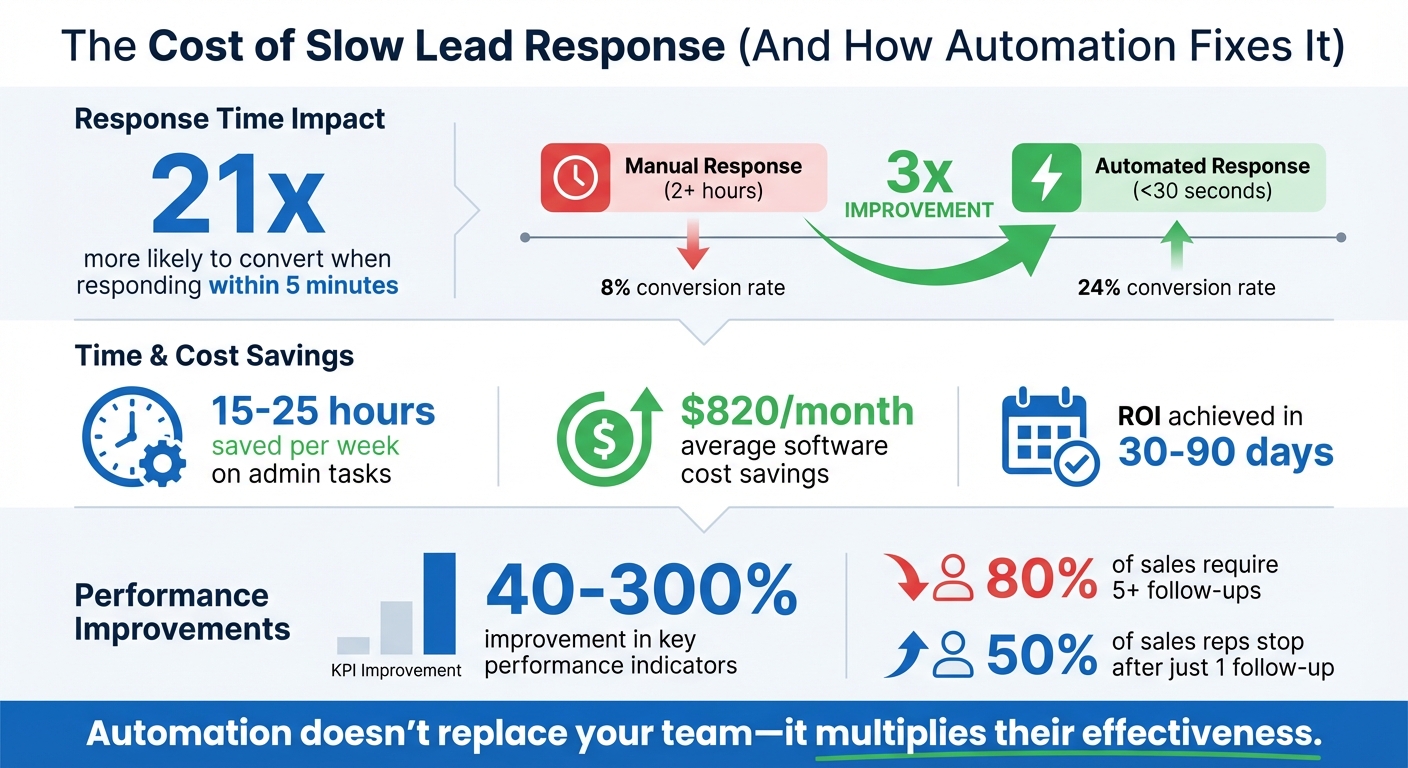
Lead Response Time Impact on Conversion Rates and ROI
Automate Your Lead Follow-Up With These 3 Simple Steps
sbb-itb-f031672
How Automation Prevents Lost Leads
Preventing leads from slipping through the cracks isn’t about adding more people to the mix - it’s about working smarter with the right tools. Marketing automation and CRM systems handle repetitive tasks that often lead to missed opportunities. From instant responses to detailed follow-ups, lead tracking, and pipeline management, automation ensures no lead is left behind. It captures and organizes lead data from various touchpoints automatically.
What Automation Does for Lead Management
Automation takes care of the tedious, manual tasks that can bog down your team. For example, when someone fills out a form, makes a call, or sends a direct message on Instagram, the system immediately logs their details into your CRM. Then, workflows kick in to send instant replies - usually within 30 to 60 seconds - via SMS or email, keeping the conversation alive while the lead’s interest is still fresh.
Take GoHighLevel as an example. It consolidates calls, ads, chats, and DMs into one streamlined platform. Its Missed Call Text Back feature automatically follows up with callers who couldn’t connect, giving you another shot at turning a missed call into a potential sale. It also handles multi-step nurture campaigns, like sending a series of five messages over ten days, to keep leads engaged.
Automation doesn’t just speed up responses; it also qualifies and routes leads based on their behavior. High-priority prospects are immediately assigned to the right sales rep, while less-urgent leads are nurtured with educational content until they’re ready to take action. Visual pipelines make it easy to see where each lead is in the process, so no one gets overlooked.
By simplifying these processes, automation not only captures leads more effectively but also saves time and boosts revenue.
Time Savings and ROI from Automation
The benefits of automation go beyond convenience - it delivers measurable results. Businesses that implement automation often save 15 to 25 hours a week on manual administrative tasks. That’s extra time your team can spend closing deals instead of updating spreadsheets or chasing follow-ups. Most automation systems pay for themselves within 30 to 90 days, thanks to increased conversions and recovered revenue.
Consider this: manual responses that take over two hours typically result in an 8% conversion rate. But when automated replies are sent in under 30 seconds, that rate jumps to 24%. Companies using automated workflows also report a 40% to 300% improvement in key performance indicators. And for agencies switching from a patchwork of tools like ClickFunnels and ActiveCampaign to an all-in-one platform like GoHighLevel, the average software cost savings is around $820 per month.
"Marketing automation should make you money, not eat it." – GoHighLevel
Setting Up Lead Pipelines in GoHighLevel
A visual pipeline is a game-changer - it replaces messy spreadsheets and sticky notes with a clear, organized view of where each prospect stands in your sales process. GoHighLevel's pipeline feature uses a drag-and-drop Kanban board, where every lead is represented as a card moving through different stages, from initial contact to a closed deal. This visual setup helps ensure no lead falls through the cracks.
Getting your first pipeline up and running is quick and simple. Head to the Opportunities tab, select Pipelines, and click Create Pipeline. Give it a name, like "Main Sales Pipeline", and define the stages that reflect your process. While the system automatically includes "Won" and "Lost" stages, the real magic lies in customizing the middle stages to align with your specific sales journey. This personalization ensures your pipeline mirrors how your business operates.
Customizing Pipelines for Your Sales Process
Your pipeline should reflect the unique steps in your customer journey. Generic stages like "Follow-Up" or "In Progress" might not cut it. Instead, create stages that match your actual workflow, such as "Consultation Booked", "Awaiting Deposit," or "Contract Review." Adding and organizing these stages is easy - just click Add Stage and reorder them to fit your process.
Automation takes this customization to the next level. For instance, you can connect lead capture tools - like forms on your website or Facebook Lead Ads - directly to your pipeline. When someone fills out a form, GoHighLevel automatically creates an opportunity in the "New Lead" stage and triggers an initial follow-up. You can even assign deal values and win probabilities to specific stages, giving you a clearer picture of your potential revenue.
Another handy feature is automatic tagging. As leads flow into your pipeline from sources like Facebook ads, website chats, or Instagram DMs, the system can tag them (e.g., "Facebook Lead" or "Webinar Attendee"). These tags make it easier to create targeted follow-up campaigns later on.
Automating Lead Assignments and Alerts
Say goodbye to manual lead distribution. With GoHighLevel, you can set up rules to automatically assign leads to the right team members. For instance, leads can be routed based on their product interest, location, or source - so inquiries about a specific service go to the right person every time.
To keep your team on their toes, configure instant alerts through Slack, email, or SMS. Notifications can be triggered when a new lead enters the pipeline or when a deal moves to a critical stage, like "Proposal Sent." Since responding within five minutes boosts your chances of converting a lead by 9x, these alerts are crucial for staying ahead. You can also set reminders to ensure no lead sits idle - for example, trigger a follow-up if a lead hasn’t been contacted within 15 minutes.
One standout feature is the Missed Call Text Back. If a prospect calls and no one is available to answer, the system automatically sends a quick text, like: "Sorry we missed your call, how can we help?" This simple gesture keeps leads engaged, even when you're busy.
| Pipeline Stage | Automation Trigger | Action Taken |
|---|---|---|
| New Lead | Form Submission | Send instant SMS/email and tag by source |
| Contacted | Outbound Call Logged | Move to "Nurture" if no response within 48 hours |
| Proposal Sent | Stage Change | Set a 3-day follow-up reminder for the sales rep |
| Stale/Cold | No activity for 7+ days | Trigger a "Reactivation" email sequence |
| Closed Won | Stage Change | Trigger onboarding and review request |
These automated workflows ensure no lead is ignored, keeping your pipeline running smoothly and your team focused on closing deals.
Creating Automated Follow-Up Workflows
Once you’ve set up your pipeline, the next step is ensuring that no lead falls through the cracks. Automated follow-ups are a game-changer here, helping you stay on top of leads without overwhelming your team. With GoHighLevel's Workflow Builder, you can craft multi-channel campaigns that connect with leads via email, SMS, voicemail drops, and even social media DMs - all from one platform. The key? Make these follow-ups feel timely and personal.
Here’s an eye-opener: 80% of sales require at least five follow-ups, yet nearly half of sales reps stop after just one. Automation bridges this gap, keeping your follow-ups consistent while your team focuses on other tasks. Studies show that quick follow-ups can significantly boost your conversion rates. Let’s dive into how you can build these automated, multi-channel workflows.
Building Multi-Channel Follow-Up Sequences
To get started, go to the Automations tab and click Create Workflow. Choose a trigger - this could be anything from a form submission to a missed call or a lead moving to a new pipeline stage. Then, map out your sequence step by step: send an email, wait a day, send an SMS, wait two more days, drop a voicemail, and so on. The drag-and-drop interface makes it simple to visualize and organize your workflow.
GoHighLevel shines when it comes to combining multiple channels. For example, you can layer SMS, voicemail drops, and Instagram DMs triggered by specific keywords like "PRICING" or "GUIDE". One eCommerce company used this approach: they sent an email, followed by a voicemail drop, and then a text message - all within five minutes. The result? A 74% reply rate within two hours.
Another standout feature is the Missed Call Text Back. If a lead calls and no one answers, the system instantly sends a text like, "Sorry we missed your call, how can we help?" This small but powerful automation can boost callback rates by 50%, keeping leads engaged and reducing the chance they’ll turn to a competitor.
Here’s an example of a follow-up timeline you can adapt to your needs:
| Follow-Up Stage | Channel | Content Focus |
|---|---|---|
| Day 1 | Email + SMS | Immediate confirmation and a value-packed offer |
| Day 3 | Share a case study or success story | |
| Day 5 | SMS or Email | Address common objections |
| Day 7 | SMS | Include a direct call-to-action or booking reminder |
| Day 10 | Offer a special incentive or create urgency |
Keep your workflows simple and modular. Overly complex sequences with dozens of steps can be hard to troubleshoot. Instead, break them into smaller, focused workflows. For instance, one workflow might handle lead capture, another could focus on nurturing, and a third might re-engage cold leads. This approach not only makes your system easier to manage but also allows for more targeted follow-ups.
Using Conditional Logic for Personalized Follow-Ups
Not all leads are the same, so why should your follow-ups be? Conditional logic - using "If/Else" branches - lets you tailor your messages based on actions, tags, or pipeline stages. For instance, if a lead clicks a link in your email, they might enter a "Hot Lead" sequence with a direct booking link. If they don’t engage, they can stay in a longer nurture sequence.
GoHighLevel processes these branches top-down, meaning it will follow the first path where the conditions are met. You can create up to 10 different branches in a single If/Else event, giving you plenty of flexibility to segment leads by behavior, interest, or source.
Here’s a real-world example: a local medspa used conditional logic to recover abandoned bookings. They set up a workflow that sent a reminder SMS 24 hours after someone started but didn’t finish scheduling an appointment. This simple setup resulted in a 32% recovery rate on missed bookings. Similarly, an insurance agency linked Facebook Lead Ads with GoHighLevel to send an SMS within 30 seconds of a form submission. That immediate response led to a 35% drop in cost-per-appointment, showing how automation can eliminate delays that often hurt follow-up success.
Tags can make your conditional logic even smarter. For example, as leads move through your pipeline, you can assign tags like "Demo Scheduled", "Facebook Lead", or "Webinar Attendee." These tags can then trigger specific follow-up sequences. Leads tagged as "High Budget" might get case studies and premium service offers, while "Budget-Conscious" leads could receive value-driven content and discounts.
Before launching any workflow, always test it thoroughly. Use a dummy contact to walk through the entire sequence, checking message timing, logic branches, and tag assignments. And don’t forget: automation should feel personal. Read your messages out loud - if they sound stiff or robotic, rewrite them. The goal is to stay on your lead’s radar without coming across as spammy.
GoHighLevel vs. Other Lead Management Tools
When it comes to preventing lost leads, businesses often turn to platforms like HubSpot or ActiveCampaign. These tools have been around for years, but many CRMs come with a catch: they require multiple subscriptions. This setup often leads to fragmented systems, higher costs, and potential data gaps. GoHighLevel takes a different approach by consolidating all the must-have tools into one platform. This is especially helpful for agencies or businesses managing multiple clients.
Here’s a closer look at what makes lead management software effective and how GoHighLevel stacks up against its competitors.
What to Look for in Lead Management Software
When evaluating lead management tools, keep these features in mind:
- Automation: The ability to manage complex, multi-channel workflows seamlessly.
- Consolidation: A single platform that eliminates the need for multiple subscriptions.
- White-Label Options: Essential for agencies looking to rebrand the software and retain clients.
- Unified Reporting: A central dashboard that tracks pipeline health, performance, and attribution across channels.
While traditional CRMs often excel at tracking pipelines, they sometimes fall short when it comes to capturing and activating leads. GoHighLevel addresses this gap by integrating lead capture and activation tools like SMS, voicemail drops, and booking features directly into the platform, eliminating the need for external integrations.
Feature Comparison Table
Here’s a side-by-side look at how GoHighLevel compares to HubSpot and ActiveCampaign for preventing lost leads:
| Feature | GoHighLevel | HubSpot / ActiveCampaign |
|---|---|---|
| Pricing Model | Flat monthly fee ($97–$297); unlimited contacts/users | Scaled pricing based on contacts or users |
| Consolidation | All-in-one: CRM, funnels, SMS, email, calendar, reputation management | Modular; often requires third-party tools like Calendly or Zapier |
| White-Labeling | Full white-label dashboard and mobile app; SaaS Pro Mode for agencies | Generally unavailable; branding remains with the provider |
| Multi-Channel Automation | Native SMS, email, voicemail drops, Instagram DMs, Facebook Lead Ads | Primarily email-focused; SMS and social often require add-ons |
| Agency Scaling | Unlimited sub-accounts on Agency Unlimited plan | Costs increase per client as accounts are added |
| Lead Recovery | Built-in Missed Call Text Back and AI chat widgets | Typically requires third-party telephony integrations |
"Most CRM tools require stacking: CRM + email tool + landing page builder + funnel builder + calendar + text tool = chaos. HighLevel replaces the stack."
– Vibe Marketing Showdown
Choosing the right CRM can make a big difference in streamlining your lead management efforts. HubSpot is a solid choice if inbound marketing and content management are your priorities, while ActiveCampaign stands out for email-focused campaigns with advanced segmentation features. But if your main goal is to stop leads from slipping through the cracks - without needing to hire extra staff - GoHighLevel’s all-in-one solution is designed to tackle missed follow-ups and fragmented data. Agencies, in particular, can benefit from the Agency Unlimited plan at $297/month, which supports unlimited sub-accounts and offers substantial savings compared to per-user pricing models.
Tracking Performance and Improving Workflows
Monitoring Pipeline Health with Dashboards
GoHighLevel's dashboard brings everything together - your CRM, messaging channels, calendars, and pipelines - all in one place. This unified view lets you monitor appointments, lead statuses, and sales activity in real-time, giving you a clear picture of your pipeline's health.
The visual sales board is a game-changer for spotting bottlenecks. For example, you can use the "Last Activity Date" filter to quickly identify deals that have gone cold and kick off re-engagement sequences. Want to pinpoint what's working? Track deal velocity to uncover process slowdowns, and use UTM attribution to zero in on your top-performing ads. These insights can directly shape your automation strategy, ensuring no leads slip through the cracks.
"You can't improve what you don't track." – The Funnel Guys
The dashboard doesn’t just stop at tracking - it also measures engagement across all your channels. Metrics like email open rates, SMS reply rates, and click-throughs help you see whether your automated follow-ups are hitting the mark or missing the target. With everything connected to your workflows, you can fine-tune each step from lead capture to conversion, making sure your system runs like a well-oiled machine.
Refining Your Automations Over Time
Setting up workflows is just the beginning. To keep them effective, regular reviews and updates are essential. A quarterly audit can help you remove outdated messages, fix dead ends, and adjust triggers based on how leads are actually behaving. If you notice your conversion rates leveling off, try A/B testing different elements like subject lines, message lengths, or call-to-action placements.
Here’s how this plays out in real life: In 2025, a medspa used GoHighLevel to create a workflow for abandoned appointments. They sent a 24-hour SMS reminder and recovered 32% of missed bookings. Similarly, an HVAC company tagged leads who didn’t book after receiving a quote. They followed up with a "$50 off" SMS seven days later and won back 18% of those cold leads. These examples show how regular tracking and tweaks can keep your system aligned with your sales goals.
Another key metric to watch is speed to lead. Leads contacted within five minutes are 21 times more likely to convert compared to those reached after 30 minutes. By combining insights from your dashboard with ongoing automation refinements, you create a feedback loop that drives continuous improvement. This approach has the potential to increase conversion rates by anywhere from 40% to 300%.
Conclusion
Leads often slip through the cracks, not because of a lack of effort, but due to manual processes that simply can't keep up with the speed and expectations of today's buyers. The reality is clear: consistent follow-ups are crucial, yet relying on manual systems makes it nearly impossible to execute them effectively. This is where automation steps in, taking over repetitive tasks and freeing your team to focus on the conversations that truly drive sales.
GoHighLevel addresses this challenge by bringing everything into one streamlined system - CRM, funnels, SMS, email, scheduling, and reputation management. By eliminating the need for disconnected tools, it ensures no lead is left behind. For instance, a UK coaching firm expanded its client base from 12 to 80 without increasing staff, and a Portland real estate brokerage saw a 42% boost in booked appointments after automating their follow-up processes.
The financial advantages are just as compelling. Starting at $97 per month, the Starter plan includes core automation tools, while the Agency Unlimited plan, priced at $297 per month, offers unlimited sub-accounts and contacts. Agencies report saving an average of $820 every month by consolidating their tech stack. But beyond the cost savings, the real value lies in preventing lost leads caused by delayed responses, missed calls, or incomplete follow-ups.
If you're tired of seeing potential revenue slip away, now's the time to act. Start your 14-day free trial of GoHighLevel and create your first workflow - whether it's a missed call text-back, an appointment reminder, or a nurturing sequence. Experience firsthand how automation can transform disorganization into predictable growth, benefiting both your team and your bottom line.
FAQs
How can automation help boost lead conversion rates?
Automation plays a key role in boosting lead conversion rates by delivering timely, consistent follow-ups and personalized nurture sequences. It takes care of organizing and prioritizing leads automatically, ensuring your team can zero in on the most promising prospects without the risk of missing out on valuable opportunities.
By simplifying tasks like lead scoring, tracking, and routing, automation keeps your business efficient and responsive without requiring additional staff. The result? You can close more deals and grow your business while using fewer resources.
How does GoHighLevel help save money on lead management?
GoHighLevel helps you save money in a few key ways. First, its all-in-one platform eliminates the need for multiple tools like email marketing software, CRMs, and landing page builders. Instead of juggling several subscriptions, you pay a flat monthly fee - $97 or $297, depending on your plan. This simplifies budgeting and avoids unexpected costs.
Second, automation helps cut labor expenses. Tasks like appointment scheduling, follow-ups, and call tracking are handled automatically. This means one employee can manage tasks that might typically require two or more people. Many businesses have reported saving hours each week, which directly lowers payroll costs.
Finally, by automating lead capture and follow-ups, GoHighLevel ensures you don’t miss out on potential clients. It helps you make the most of your marketing budget while improving client retention. The result? Fewer missed opportunities and better revenue potential - all while keeping expenses in check.
How can I set up customized follow-ups to match my sales process?
With GoHighLevel's visual Workflow Builder, you can design customized follow-up processes tailored to your needs. Begin by selecting a trigger to kick off the workflow - this could be something like a form submission or a missed call. From there, add follow-up actions such as emails, SMS messages, or voicemail drops. To make your communication more personal, include merge fields like {{first_name}}.
You can fine-tune the timing between steps to align with your sales rhythm. Additionally, use conditional logic to guide leads through different paths depending on their actions - like whether they open an email or schedule an appointment. Once you've built your workflow, test it thoroughly to ensure it runs smoothly. After activation, keep an eye on performance metrics to make adjustments and improve efficiency. This system helps you stay organized and maintain consistent engagement with leads, all without increasing your team size.