How to Use an AI Receptionist to Answer Calls 24/7 (Without Hiring Staff)
By HL Max14 min read
Missed calls cost businesses opportunities. An AI receptionist solves this by answering calls 24/7, handling inquiries, scheduling appointments, and routing urgent issues - all without requiring a human team. It's faster, more reliable, and significantly cheaper than hiring a full-time receptionist.
Why switch to AI?
- Cost savings: AI services cost $50–$300/month vs. $36,000+ annually for a human receptionist.
- Efficiency: Handles multiple calls simultaneously, integrates with CRMs, and syncs with calendars.
- Always available: AI doesn’t take breaks, works after hours, and even manages holiday calls.
Setting up an AI receptionist involves planning call workflows, customizing scripts, and integrating tools like calendars and CRMs. Platforms like HighLevel Voice AI offer user-friendly, all-in-one solutions tailored for businesses and agencies. With proper setup and ongoing improvements, an AI receptionist ensures no call - or opportunity - is ever missed.
How to Build Fully Working AI Receptionists to Sell To Local Businesses (COPY This!)
Planning Your AI Receptionist Setup
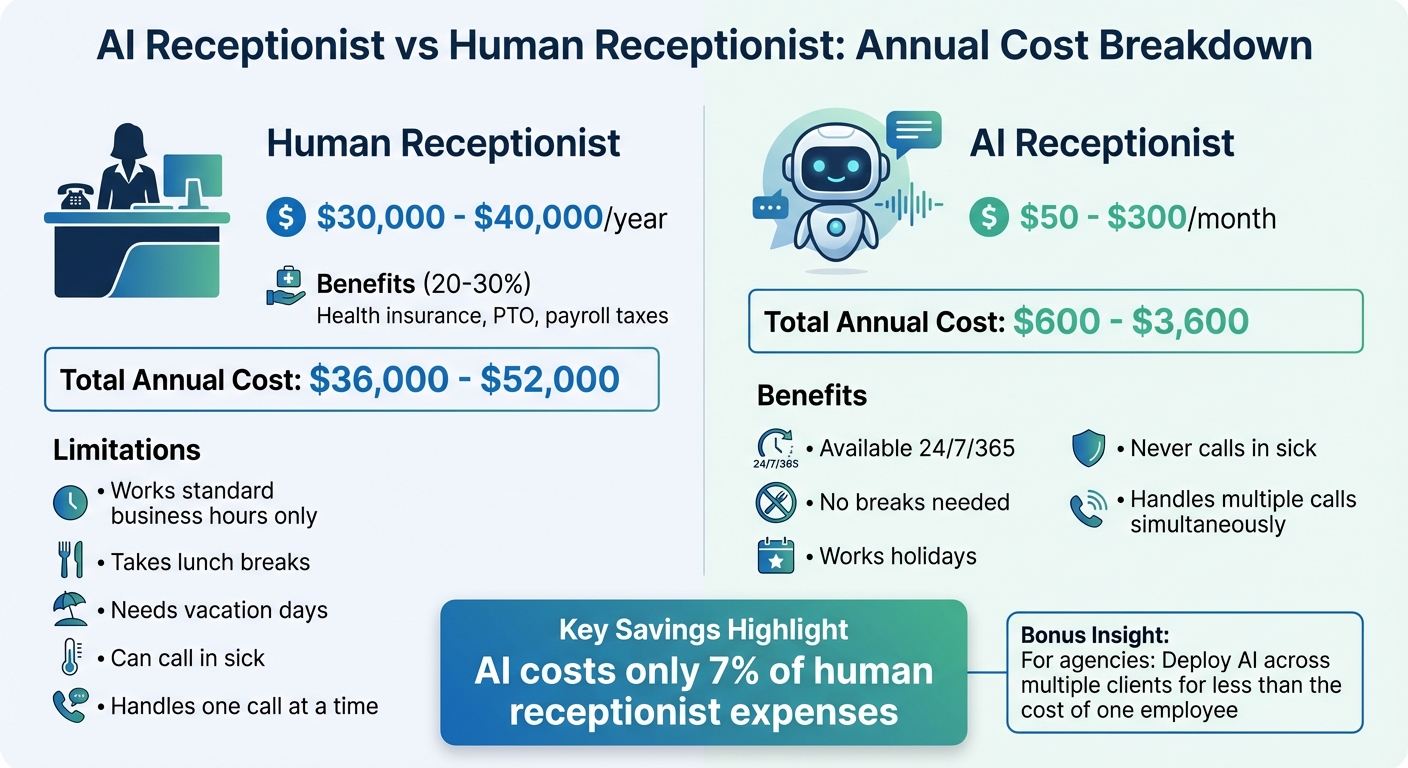
AI Receptionist vs Human Receptionist Cost Comparison
Setting up an AI receptionist takes some upfront thought, but it’s worth the effort. A solid plan prevents caller confusion and ensures you don’t miss opportunities. Spend a few hours ironing out the details now, and you’ll save yourself weeks of headaches later. Start by analyzing costs, identifying call types, and designing workflows to create a streamlined system.
Cost Comparison: AI vs. Human Receptionist
Let’s talk numbers. A full-time receptionist in the U.S. typically earns between $30,000 and $40,000 annually. Add in benefits like health insurance, paid time off, and payroll taxes, and you’re looking at an extra 20-30% on top of that. All in, this can total anywhere from $36,000 to $52,000 a year for standard business hours.
Now compare that to AI receptionist platforms. Most charge between $50 and $300 per month, depending on call volume and features. Even at the higher end, you’re spending about $3,600 a year - roughly 7% of the cost of a human receptionist. Plus, AI doesn’t take lunch breaks, call in sick, or need vacation days. It can handle multiple calls simultaneously during busy periods and works through holidays without complaint.
For agencies managing multiple clients, the savings multiply. You can deploy AI receptionists across several accounts for less than the cost of hiring just one employee.
Identifying Call Types and Required Information
Once you’ve got a handle on costs, it’s time to figure out what kinds of calls your AI will handle. Start by reviewing your call logs from the past month. Categorize incoming calls into groups like new lead inquiries, existing client questions, appointment scheduling, support requests, and general information.
For each call type, outline the key details your AI needs to collect. For example:
- New leads: Name, phone number, email, service interest, and timeline.
- Appointments: Preferred date and time, service type, and any special requests.
- Support calls: Account information, problem description, and urgency level.
Tailor these details to your industry. A law firm might need to ask about case type and check for conflicts of interest, while an HVAC company might need to distinguish between emergency repairs and routine maintenance. The more specific you are, the better your AI can perform.
Creating Call Flows and Success Metrics
Designing an effective call flow is crucial. Map out how your AI will guide callers from greeting to resolution based on their needs. During business hours, it might handle simple requests on its own while transferring more complex issues to your team. After hours, it can gather details and promise a callback by a set time - say, 10:00 AM the next business day.
Don’t forget to include escalation triggers for urgent cases. For example, if a caller mentions words like "emergency", "urgent", or "ASAP", your system should either transfer the call immediately to an on-call number or flag it for priority follow-up. Integrating real-time data access, like checking calendar availability or pulling account details, adds another layer of efficiency.
Finally, track performance with success metrics. Measure things like:
- Appointments booked per 100 calls
- Average handling time per call
- Caller satisfaction ratings
- Cost per call handled
If you’re running an agency, you can also track client retention rates and revenue from after-hours leads. These numbers will show whether your AI receptionist is meeting expectations or needs tweaking.
Set realistic goals. For example, if your human receptionist converted 30% of new lead calls to appointments, aim for your AI to hit 25-30% in the first month. With fine-tuning, you can push that number even higher.
Once you’ve nailed down these details, you’ll be ready to choose and implement the AI receptionist that fits your business needs.
Choosing and Installing Your AI Receptionist
Once your call flows are mapped out and costs are evaluated, the next step is to pick and set up your AI receptionist. The right solution will depend on your business needs - some tools focus solely on automating calls, while others combine AI with live human support for a hybrid approach.
How to Choose an AI Receptionist Tool
The basics matter. Your AI receptionist should be available around the clock, offering a natural, friendly voice to build trust with callers. Look for features like appointment scheduling that syncs with your calendar, CRM integration to capture lead details, and customizable prompts so you can tailor responses to your business.
For agencies, white-labeling is a must. This allows you to rebrand and resell the platform without revealing it's third-party software. Transparency in pricing (in US dollars) is another key factor - be aware of any restrictions, such as limits on call volume or minutes. Finally, ensure the tool can handle tasks like qualifying callers based on location or service type, answering FAQs, and personalizing greetings - all without human involvement.
HighLevel Voice AI checks these boxes and more. It combines multiple tools - like CRM, scheduling, and call handling - into one platform. This setup is ideal for agencies and small businesses looking to simplify their tech stack and manage everything in one place.
Setting Up HighLevel Voice AI
Getting started with HighLevel Voice AI is simple. Begin by connecting a US phone number to your HighLevel account. You can either port an existing number or purchase a new one directly through the platform. Once the number is active, head to the Voice AI settings in your dashboard.
Here’s where you can customize the AI’s behavior. Create a branded greeting like, "Thanks for calling [Your Business Name]. How can I assist you today?" Set up call routing rules so the AI knows when to handle calls independently and when to pass them to a team member. Link your HighLevel calendar to enable real-time appointment scheduling.
Next, integrate Voice AI with your HighLevel CRM so that caller details - such as their name, phone number, and service interest - are automatically added to your pipeline. Test the setup thoroughly by calling your own number, experimenting with different scenarios (like booking an appointment or asking FAQs), and fine-tuning the prompts until the AI responds perfectly. Once live, continuously tweak your call scripts to keep performance sharp.
HighLevel vs. Other AI Receptionist Tools
If you’re comparing HighLevel with alternatives like Smith.ai, the key difference lies in their approach. Smith.ai offers a hybrid model, blending AI with 24/7 live human agents. For instance, in October 2025, Smith.ai managed a call for Mountain Plumbing, where the AI collected the caller’s name, location, and emergency details before transferring the case to a human agent who scheduled a same-day appointment.
HighLevel, however, stands out for agencies and small businesses because of its all-in-one design. While Smith.ai focuses on call handling, HighLevel goes further by replacing multiple tools - like CRMs, email marketing platforms, funnel builders, and appointment schedulers - with a single platform. This not only reduces costs but also eliminates the hassle of managing multiple systems. Agencies benefit even more with HighLevel’s white-label option, allowing them to rebrand and resell the platform as their own.
| Feature | HighLevel Voice AI | Smith.ai |
|---|---|---|
| 24/7 AI Call Handling | Yes | Yes |
| Live Human Backup | Optional (via team transfer) | Yes (built-in) |
| CRM Integration | Built-in (native) | Requires third-party connection |
| Appointment Scheduling | Built-in (native) | Yes |
| White-Label Capability | Yes | No |
| Best For | Agencies & SMBs wanting an all-in-one platform | Businesses preferring hybrid AI-human models |
Interested in trying it out? Start your free HighLevel trial here and set up your AI receptionist in under an hour.
sbb-itb-f031672
Configuring Your AI Receptionist
Once you've installed your AI receptionist, it's time to make it truly yours. Customizing the system to reflect your brand is critical - nobody wants to interact with a generic, robotic voice. Callers expect professionalism, warmth, and clarity from the very first "hello." The goal here is to craft scripts that sound natural, integrate your calendar for hassle-free scheduling, and ensure the AI handles every scenario consistently.
Writing Call Scripts and Prompts
Your greeting is the first impression - make it count. It sets the tone for the entire interaction and builds trust before the conversation even begins. A great phone greeting balances clarity, personality, and your brand's unique tone. For instance, instead of a dull "Hello, how can I help you?" try something more engaging, like: "Thanks for calling [Your Business Name]! Whether you’re looking to book an appointment or have a quick question, I’m here to assist." This style feels approachable and immediately communicates what the AI can do.
Next, outline the key questions your AI needs to ask. Think about what matters most in your industry. If you're a plumber, the AI should gather details like the caller's name, location, and whether they’re dealing with an emergency. For a salon, it might ask about the desired service and stylist preferences. Keep your questions short and easy to understand - nobody likes wading through complicated language. Also, establish clear escalation protocols. For example, if someone asks about pricing for a customized service, the AI could respond, "Let me connect you with someone who can provide a detailed quote."
A well-crafted script ensures consistency and keeps your brand voice intact. Once your script is ready, the next step is integrating it with your calendar to streamline scheduling.
Connecting Appointment Booking and Calendars
With your scripts in place, it's time to connect your AI to your scheduling system. If you’re using HighLevel, head to the Integrations section and link your Google Calendar or Microsoft Outlook. After connecting, set your availability rules - block off lunch breaks, define appointment durations (e.g., 30 minutes for new clients), and mark holidays in advance so the AI can adjust automatically.
Your AI should check real-time availability before suggesting time slots to avoid double bookings and maintain accuracy. Once an appointment is booked, the AI will add it directly to your calendar and instantly send a confirmation via SMS or email. For rescheduling or cancellations, program the AI to handle natural language requests like, "Can we move my appointment from Tuesday to Thursday?" The system will update your calendar and send a new confirmation, all without human assistance.
To minimize no-shows, set up automated reminders - like a simple text message sent 24 hours before the appointment. Test the entire process yourself by calling your number to book, reschedule, and cancel appointments. This ensures everything syncs perfectly and works as expected.
Testing and Improving AI Responses
Testing doesn’t stop after setup - it’s an ongoing process. Start by simulating real-world scenarios: call your AI and ask common questions, try booking during unavailable times, or throw in unusual requests like services you don’t offer. Record these calls and track metrics such as call duration and successful bookings to identify areas for improvement.
Use these recordings to refine your prompts. If callers keep asking questions that confuse the AI, update that part of the script. Pay close attention to performance data, especially escalation rates, to pinpoint and fix weak spots.
As your business grows and changes, keep your AI up to date. Update scripts to reflect new services, seasonal hours, or special promotions. The more you tweak and test, the better your AI becomes at handling calls smoothly and efficiently. Continuous improvement is the secret to making your AI receptionist a seamless extension of your business.
Automating Follow-Up and Tracking Results
Streamlining follow-ups and monitoring outcomes after each call can significantly boost efficiency and revenue. Once your AI receptionist is up and running, you can extend its functionality with automated follow-up processes and performance tracking.
Setting Up Automated Follow-Up
Integrate your AI receptionist with your CRM and calendar using HighLevel's tools, such as Google Calendar or Outlook. This setup enables you to automate actions based on call outcomes. For instance, when a customer books an appointment, the system sends an automatic confirmation along with a calendar link. If no appointment is scheduled, the system can trigger a follow-up email featuring testimonials or a limited-time offer.
To handle urgent issues, configure team alerts for calls requiring immediate human attention. For example, if the AI detects keywords like "emergency" or "urgent repair", it can instantly notify the on-call team with a detailed summary of the call. This ensures the customer doesn't have to repeat their concerns. Additionally, the AI can analyze call transcripts and create follow-up tasks in your CRM, such as "Send product catalog to interested lead" or "Follow up on custom quote request." Companies like Owen Security have seen impressive results, reducing call volume by 90% and saving 8–10 hours each month by automating call routing and eliminating spam.
Measuring Performance and ROI
Focus on the metrics that matter most - call volume, booked appointments, lead conversions, and revenue generated. Many AI receptionist platforms include dashboards that provide real-time insights into these figures. HighLevel, for example, allows you to create custom reports to track how many calls convert into appointments, which types of calls drive the most revenue, and areas where efficiency can be improved.
The financial benefits are compelling. While a full-time receptionist costs around $3,000–$3,500 per month, AI services range from just $25–$300 monthly. Over time, these savings are substantial. Small businesses can save as much as $250,000 over five years by switching to AI. The cost per interaction is dramatically lower too - AI interactions typically cost $0.25–$0.50 per call, compared to $3.00–$6.00 for human agents, resulting in an 85–90% cost reduction.
Real-world examples highlight these advantages. Acura of Auburn, for instance, generated $30,000 in new revenue in just five days. Similarly, Clear Speech eliminated a 20-child waitlist while capturing all referral opportunities. These are not theoretical benefits - they are tangible results from businesses that have implemented AI receptionist solutions. Such outcomes not only demonstrate the return on investment but also help agencies refine their offerings for clients.
Reselling AI Receptionist Services to Clients
For agencies, AI receptionists represent a valuable opportunity to generate recurring revenue. HighLevel's white-label capabilities let you rebrand and offer these services as part of a comprehensive solution for your clients. The platform can handle calls, book appointments, and manage follow-ups, all under your agency's branding.
To showcase the benefits, compare your clients' current challenges - like missed calls, unreturned voicemails, and lost appointments - with the streamlined operations an AI receptionist can provide. HighLevel's reporting tools make it easy to produce monthly performance reports, detailing metrics such as calls handled, appointments scheduled, and revenue generated. This level of transparency builds trust and underscores the long-term value of the service, making it a win-win for agencies and their clients.
Getting Started with Your AI Receptionist
Did you know that businesses miss 37.8% of inbound calls? That’s a lot of lost opportunities and revenue every single day. Setting up an AI receptionist can help solve this issue, and most platforms can have you up and running in just 24 hours.
To get started, build on the planning steps we’ve covered earlier. Identify your call volume, the most common types of inquiries, and any integration needs you might have. Once you have that figured out, choose a platform that fits your workflow and budget. For example, HighLevel Voice AI is designed specifically for agencies and service-based businesses, offering an all-in-one solution. No need to juggle multiple subscriptions or wrestle with complicated integrations - it even includes built-in CRM and calendar tools to make setup a breeze.
Next, create your AI receptionist’s profile. This involves naming it, selecting a voice that aligns with your brand, and uploading essential business details like FAQs, service descriptions, operating hours, and holiday schedules. The AI is designed to adapt to each caller dynamically, providing a personalized experience much like a real employee. As F. David Schultz from Vendasta puts it:
"AI is most successful when treated like a real employee - one that needs training, supervision, and ongoing refinement."
Businesses that take an active role in shaping their AI receptionist - treating it like a new team member - tend to achieve better results. Regularly reviewing call transcripts and fine-tuning responses can make a big difference. Most platforms provide a dashboard where you can track real-time stats, call summaries, and areas for improvement.
The results speak for themselves: 80% of users report positive experiences with AI-powered customer service, and response times for common questions can drop by as much as 37%. Ready to stop missing calls? Start your free HighLevel trial today, and let your AI receptionist handle the phones while you focus on growing your business.
Once your AI receptionist is set up, the next step is to focus on refining and optimizing its performance.
FAQs
How does an AI receptionist manage emergency calls compared to regular inquiries?
AI receptionists are programmed to spot urgent situations by recognizing critical keywords or phrases that signal emergencies. When such cases are detected, the system quickly routes the call to a human representative or dispatcher to ensure a prompt response. For less pressing matters, the AI takes care of routine tasks like scheduling appointments or answering frequently asked questions, easing the workload and improving communication efficiency.
How can I set up an AI receptionist for my business to handle calls 24/7?
To get your AI receptionist up and running, log into your platform's admin portal and locate the virtual assistant or AI receptionist feature. From there, you can tailor the system to fit your business needs. Set up your call flow by defining business hours, adding essential company information, and customizing greetings and call routing preferences. Once configured, test the system by running through various call scenarios to see how it performs. Use the results to tweak and refine its responses. With this setup, your AI receptionist will be ready to handle calls efficiently 24/7, streamlining communication and saving valuable time.
How can I make sure my AI receptionist reflects my brand and delivers great customer service?
To make sure your AI receptionist truly represents your brand and delivers the level of customer service you expect, fine-tune its tone, language, and greetings to match your brand’s personality. Keep its knowledge base current with accurate, brand-specific details, and regularly review call interactions to spot opportunities for improvement. Staying consistent and keeping a close eye on performance are essential for delivering top-notch service and a smooth customer experience.