How to Automate Client Follow-Ups So You Never Lose Another Sale
By HL Max14 min read
Missed follow-ups are costing you sales. 80% of sales need at least five follow-ups to close, but 44% of salespeople stop after one. Worse, 78% of customers buy from the company that responds first, yet many businesses lose leads due to slow or disorganized follow-up processes. If you're still using spreadsheets or manual reminders, you're wasting time and losing deals.
The solution? Automating your follow-up process. Automation ensures instant responses, consistent communication, and frees up your team to focus on closing sales. Here's what you'll learn:
- Why slow or manual follow-ups hurt your business.
- How automation improves response times and keeps leads engaged.
- Step-by-step strategies to build automated workflows for emails, texts, and calls.
- Tips for setting up tools like HighLevel to streamline your sales pipeline.
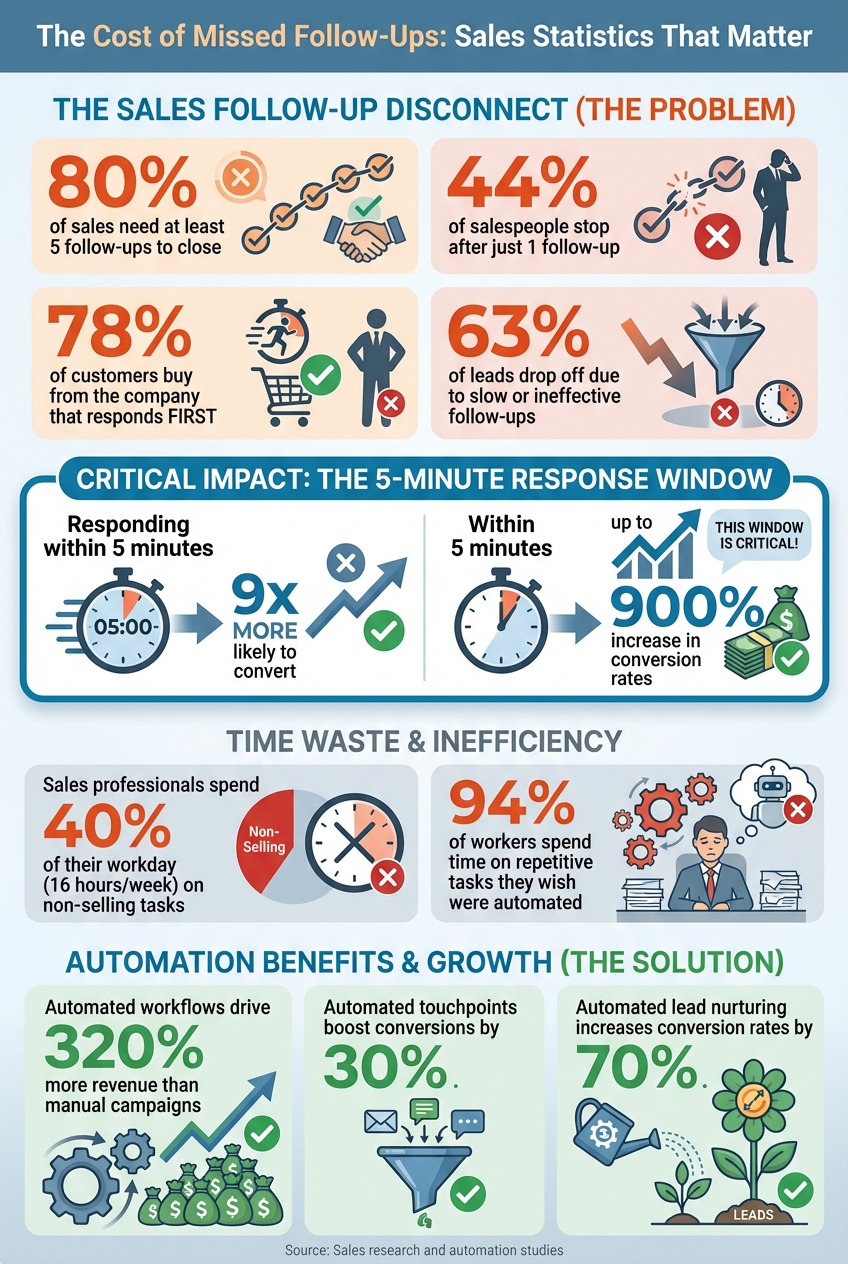
The Cost of Missed Follow-Ups: Key Statistics on Sales Response Times and Conversion Rates
Why Poor Follow-Ups Cost You Sales
What Missed Follow-Ups Actually Cost Your Business
Every missed follow-up isn’t just a lost opportunity - it’s money walking out the door. Research shows that if you don’t respond to a lead within five minutes, you’re 9 times less likely to convert them. On the flip side, companies that do respond within this golden window can see conversion rates skyrocket by up to 900%. Yet, over 63% of leads drop off simply because of slow or ineffective follow-ups. That’s a lot of potential revenue slipping through the cracks.
And it’s not just about lost sales - it’s also about wasted time. Sales professionals spend nearly 40% of their workday on non-selling tasks like manual data entry, scheduling, and tracking down leads. That’s roughly 16 hours a week per salesperson that could’ve been spent closing deals.
These inefficiencies highlight the deeper issues caused by relying on manual follow-up processes.
Problems with Manual Follow-Up Systems
Manual follow-up systems start to fail the moment your workload increases. When your system relies on spreadsheets, sticky notes, or scattered tools, it’s inevitable that some leads will fall through the cracks. This isn’t a matter of effort - it’s a structural problem. After all, 80% of sales require at least five follow-ups to close the deal.
Timing is another major hurdle. Let’s say a lead fills out your form at 7:00 PM on a Tuesday. By the time you check it the next morning, they’ve likely already contacted your competitors. Considering that 78% of customers go with the first company to respond, a delayed follow-up could cost you the deal before you even start.
Then there’s the chaos caused by disconnected tools. If your emails, calls, and scheduling happen on separate platforms, it’s easy to lose track of conversations or accidentally double-message a lead. It’s no surprise that 94% of workers admit to spending part of their week on repetitive tasks they wish were automated. Manual follow-ups tend to top that list.
How Automation Fixes These Problems
Automation solves these challenges by responding to leads instantly - whether it’s through SMS, email, or a missed call text-back. This ensures you consistently hit that critical five-minute response window, no matter when a lead reaches out.
Here’s how it works: automation follows a simple trigger-action principle. For example, when a lead fills out a form or clicks a link, the system automatically takes the next step - sending a follow-up text, scheduling an email, or notifying your sales team. Best of all, these workflows operate 24/7, so no lead is left waiting for a response, even outside business hours.
Automation also handles follow-up persistence without the risk of burnout. Instead of relying on a salesperson to remember every touchpoint, you can set up a sequence that spaces out texts, emails, and calls over days or weeks. The system doesn’t forget, doesn’t get tired, and keeps your business top-of-mind until the lead is ready to make a decision - or opts out.
"Automation isn't about removing the personal touch - it's about making sure you never miss the moment to add it." - Jetpack CRM
The numbers speak for themselves: automated follow-up workflows can drive 320% more revenue than manual campaigns. Incorporating automated touchpoints can also boost overall conversions by 30%. It’s not just about saving time - it’s about closing more deals and growing your business.
Now that we’ve identified the problems and solutions, let’s dive into how to build an automated follow-up framework that works.
How To Automate Your Sales Call Follow-up Process with AI | Google Meet + Zapier + Notta + OpenAI
Building a Follow-Up Framework That Works
Creating an effective follow-up framework doesn't have to be a headache. The idea is simple: match automated messages to each stage of the journey from lead to client. By keeping it structured yet straightforward, you can cover all the bases without overloading your team.
Let’s dive into the scenarios that can make an immediate difference.
Which Follow-Up Scenarios to Automate First
Not all follow-ups pack the same punch. Focus on these high-priority situations to see results quickly:
- New Lead Inquiries: When someone fills out a form, clicks on an ad, or initiates a chat, they’re expecting a quick response. Send an automated SMS or email within seconds to confirm you’ve received their inquiry. This small step can make a big difference - 78% of customers go with the company that responds first.
- Appointment Reminders: Missed meetings are a waste of time and opportunity. After a booking, send an immediate confirmation, then follow up with reminders 24 hours and one hour before the appointment. These simple nudges help ensure your prospects show up.
- Post-Meeting Follow-Ups: After a call or demo, keep the momentum going. Send an automated email summarizing key points, next steps, and any promised materials. If you’ve sent a proposal and haven’t heard back after two days, a polite reminder can help move things forward.
- Re-Engagement Campaigns: Cold leads don’t have to stay cold. For those who’ve been unresponsive for 30+ days, set up a sequence with a personal check-in, a relevant case study, or even a straightforward “break-up” email asking if they’d prefer to be removed from your list.
Here’s a clear example of how this could look in a sales pipeline:
| Sales Stage | Key Trigger | Automated Action |
|---|---|---|
| New Lead | Form submission or ad lead | Instant SMS/email confirmation + notify sales rep |
| Qualification | No booking after 48 hours | Reminder text with a calendar link |
| Appointment | Booking confirmed | Immediate invite + reminders 24 hours and 1 hour before |
| Post-Meeting | Proposal sent | Follow-up email with takeaways; 2-day reminder if no reply |
| Closed Won | Deal marked as "Won" | Welcome email + intake form + internal task creation |
| Post-Service | Job or project complete | Request for review + referral offer |
| Cold Lead | 30+ days of inactivity | Reactivation sequence with a special incentive |
With these scenarios mapped out, the timing and method of follow-ups become the next critical considerations.
When and How to Reach Out
Timing is everything. Responding within five minutes can dramatically increase your conversion rates. However, it’s just as important to send messages at appropriate hours - typically between 8:00 AM and 8:00 PM local time - to respect prospects' schedules and stay compliant with regulations.
Choosing the right communication channel is equally important:
- SMS: With an impressive 98% open rate, SMS is perfect for urgent messages like appointment reminders or instant responses to inquiries.
- Email: Ideal for sharing detailed content, such as case studies or proposals.
- Voicemail Drops: Add a personal touch without requiring a live call.
A multi-channel approach works best. For instance, you could send an SMS within one minute of a form submission, follow up with an email two hours later, and leave a voicemail on day two if there’s still no response.
For businesses in the U.S., make sure every automated message includes an opt-out option to comply with laws like the TCPA and CAN-SPAM Act.
How to Follow Up Without Being Annoying
The key to effective follow-ups lies in thoughtful timing and personalized content. While persistence matters - 80% of sales need at least five follow-ups to close - no one wants to feel hounded. Space out your messages and ensure each one adds value. Stop the sequence as soon as the prospect responds.
Here’s an example of a 5-part nurture sequence spread over 10 days:
- Day 1: Share something helpful, like a resource or introduction to your service.
- Day 3: Highlight a relevant success story or case study.
- Day 5: Address common questions or concerns.
- Day 7: Send a reminder to book a meeting or include a calendar link.
- Day 10: Add urgency with a time-sensitive offer or incentive.
Once a prospect engages, immediately remove them from the sequence to avoid redundancy.
"Automation doesn't mean your business runs on autopilot while you sip coffee all day. CRM automation supports your sales and service efforts. It doesn't replace them."
- HighLevel
Finally, make your automated messages feel personal. Use the recipient’s name, reference their specific needs or actions, and keep the tone friendly and conversational. The goal is to make automation feel like a helpful assistant, not a cold machine.
sbb-itb-f031672
How to Set Up Automated Follow-Ups in HighLevel
HighLevel simplifies follow-ups with its trigger-action system, automating tasks like sending texts, assigning tasks, or bridging calls whenever specific events occur. Its visual builder makes the process straightforward, requiring no coding skills. Here's a step-by-step guide to setting up your automated follow-up system.
Setting Up Your CRM and Workflow Basics
Start by building a solid CRM foundation. Import your contacts or set up lead-capturing forms to ensure your system has a steady flow of data. Next, validate your phone settings under Settings > Phone Numbers, and enable the "Call Connect Feature" to handle automated calls seamlessly.
To keep your leads organized, create custom fields and tags. For instance, tag leads based on their source - like "Facebook Lead", "Website Contact", or "Referral" - to personalize follow-ups later on. Use the "Add to CRM" action at the beginning of each workflow to automatically assign these tags as leads enter your system. This way, you can tailor your approach, treating a demo request differently from a general inquiry.
Once your CRM is set up, you're ready to design your automated workflows.
Creating Automated Workflow Sequences
HighLevel's workflow builder functions like a flowchart, where you define triggers (events that initiate the automation) and actions (what happens next). Common triggers include form submissions, missed calls, or updates to a lead's pipeline status.
For example, a "New Lead Follow-Up" workflow might start with a form submission trigger. This could send an instant SMS confirmation, followed by an email with details like a calendar link. If no response is received, a reminder text can be scheduled. HighLevel also offers pre-built templates, known as "Recipes" - like the "Fast Five" for quick lead follow-up - which you can customize to suit your business needs.
To avoid redundant messaging, use the "Stop on Response" setting. This ensures the system halts follow-ups once a lead replies, preventing unnecessary messages after engagement.
Using Email, SMS, and Voice in Your Workflows
HighLevel allows you to combine multiple communication channels - email, SMS, voicemail drops, and live calls - within a single workflow. SMS works well for instant engagement (with a 98% open rate), while email is ideal for sharing detailed content such as proposals or case studies. For leads showing high intent, you can use the "Call Connect" action to connect them directly with your sales team. This multi-channel strategy creates timely and personalized interactions that can significantly improve conversion rates.
When setting up Call Connect, include a Whisper Message to inform your sales rep about the caller before they answer. For example:
"New lead from Facebook: [Name]. Press any key to connect."
Be sure to include "press any key to connect" in the whisper message. Without it, the system may repeat the message unnecessarily, causing delays. Also, enable voicemail detection to ensure the system doesn't mistake a voicemail for a successful connection.
If you're sending SMS to a large group (100+ leads), use the "Drip action". This spaces out messages, sending them in smaller batches to maintain deliverability and avoid overwhelming your system.
"Workflow automation isn't about replacing people, it's about removing the bottlenecks that keep teams from growing."
- Hamraj Kumar, Organic Search Marketing, HighLevel
For agencies, HighLevel's white-label options offer an additional revenue opportunity. You can brand the platform as your own and charge clients a platform access fee, turning automation into a profitable service.
Improving and Scaling Your Follow-Up System
Once your workflows are up and running, the next step is to monitor their performance and make adjustments to boost results. HighLevel provides insights into key metrics like response times, conversion rates, engagement rates (opens, clicks, replies), lead-to-appointment ratios, and revenue per lead.
Metrics to Track and How to Improve Them
Keep an eye on five essential metrics: response time, conversion rate, engagement rate, lead-to-appointment ratio, and revenue per lead. If your booking rates are falling short, tweak your message timing or refine your calls-to-action. Low engagement with SMS? Try revising your message content or testing other communication methods. Conduct quarterly reviews to identify what’s not working, refresh outdated copy, and fine-tune triggers. Even small changes - like reworking a subject line or adjusting follow-up intervals - can have a big impact.
To take things further, segment your audience and tailor your follow-ups for better results.
Customizing Follow-Ups for Different Audiences
Not every lead requires the same approach. HighLevel’s smart lists and tagging features let you group contacts by factors like lead source (Facebook, website, or referral), service interest, deal size, or lifecycle stage. For instance, high-value prospects may benefit from a more personalized strategy, while others might respond well to a standard follow-up sequence. You can also use behavior-based triggers - such as a lead revisiting your pricing page - to send timely, customized messages. By aligning your follow-up content with each lead’s intent, segmentation helps boost conversions and makes your outreach feel more relevant.
Why HighLevel Beats Using Multiple Tools
Using multiple tools for email, SMS, CRM, funnels, and scheduling can create inefficiencies, from siloed data to integration delays - not to mention higher costs. HighLevel solves this by consolidating everything into one platform. Its all-in-one dashboard keeps your lead data and activity history centralized, cutting down on costs and complexity. At $297/month for the Unlimited plan, you get unlimited sub-accounts, contacts, and API access, which is often more affordable than juggling multiple subscriptions. Plus, you can white-label the platform and offer it to your clients as a service, turning automation into an additional revenue stream.
| Feature | HighLevel All-in-One | Multiple Single-Purpose Tools |
|---|---|---|
| Monthly Cost | $97–$297 (single fee) | Higher (multiple subscriptions for CRM, email, SMS, funnels) |
| Setup Complexity | Low (native drag-and-drop workflows) | High (requires Zapier or custom API integrations) |
| Data Consistency | High (centralized lead data and activity history) | Low (siloed data across apps; hard to track ROI) |
| Follow-Up Speed | Instant (trigger-based automation) | Variable (delays from manual data transfer) |
| Scalability | Easy (Snapshots clone workflows instantly) | Difficult (manual setup for each new client) |
"It's been a complete game-changer for me. We've built our whole business around HighLevel now. We'll never go back."
- Christine Seale, President & CEO, NerdLevel
For businesses managing multiple clients or locations, the Unlimited plan simplifies scaling. You can create separate sub-accounts for each client, use Snapshots to quickly replicate proven workflows, and oversee everything from a single dashboard. When sending SMS to large groups (100+ leads), the Drip action ensures messages are sent in batches, maintaining deliverability. This keeps your system efficient and effective as you grow - without adding unnecessary complexity or extra staff.
Conclusion
Missed follow-ups can cost you big. With over 63% of leads dropping off due to slow outreach, relying on manual follow-ups drains both revenue and resources. Automation solves this by delivering consistent, timely communication across email, SMS, and voice - without overwhelming your team.
HighLevel brings everything together in one platform, priced between $97 and $297 per month, combining your tools and data into a single solution. By automating repetitive tasks like scheduling and data entry, you can save nearly 40% of your team’s time, allowing them to focus on closing deals. Plus, automated lead nurturing increases conversion rates by 70% while cutting manual outreach time in half.
These time savings and efficiency gains lead to measurable business growth. The benefits are clear: faster responses for your leads, streamlined workflows for your team, and scalable growth without adding extra staff. With a 4.9/5 star rating from over 5,598 users, HighLevel has earned its reputation as the go-to platform for agencies and SMBs looking to grow.
Don’t let slow follow-ups hold you back. Start your 14-day free trial, set up a high-impact sequence like instant lead response, and take charge of your pipeline today.
FAQs
How can automating client follow-ups help increase sales?
Automating client follow-ups is a game-changer for maintaining timely and consistent communication, which is crucial for keeping leads interested. Research highlights that responding to inquiries within minutes can increase conversion rates by an astonishing 900%. Automation ensures no lead slips through the cracks.
With tools that combine email, SMS, and reminders, you can simplify your workflow, minimize missed opportunities, and nurture stronger connections with potential clients. The result? You save time and significantly improve your chances of closing more deals.
How can I set up an automated follow-up system to stay connected with clients?
To get your automated follow-up system running with GoHighLevel, start by logging into your account and heading over to the Automation menu. Once there, click on Create Workflow to open the workflow builder. You’ll have the option to choose from pre-built recipes like the Email Drip Sequence or an SMS version, making it easier to manage your follow-ups.
The next step is setting up a trigger to activate the workflow. For instance, you can select Form Submitted, pick the specific form you want to monitor, and save your settings. To keep things organized, consider naming your workflow something clear, like “New Lead Follow-Up.” With these steps in place, your system will automatically handle follow-ups, ensuring leads are engaged promptly as they interact with your business.
How can HighLevel help me automate client follow-ups and avoid losing sales?
HighLevel takes the hassle out of client follow-ups by automating email, SMS, and AI-powered communications. This ensures you can effortlessly stay connected with leads and clients, keeping your communication seamless and timely. No more missed opportunities or forgotten follow-ups - HighLevel keeps everything running smoothly.
The platform is perfect for businesses and agencies looking to simplify their workflows. By cutting down on manual tasks, HighLevel lets you focus on what really matters: strengthening client relationships and driving long-term results. Tailored for agencies and small businesses, it offers an efficient, all-in-one solution to manage follow-ups and client engagement with ease.