How to Automatically Respond to Google Reviews with AI (And Why You Should)
By HL Max13 min read
Responding to Google reviews is crucial for business growth. Here's why:
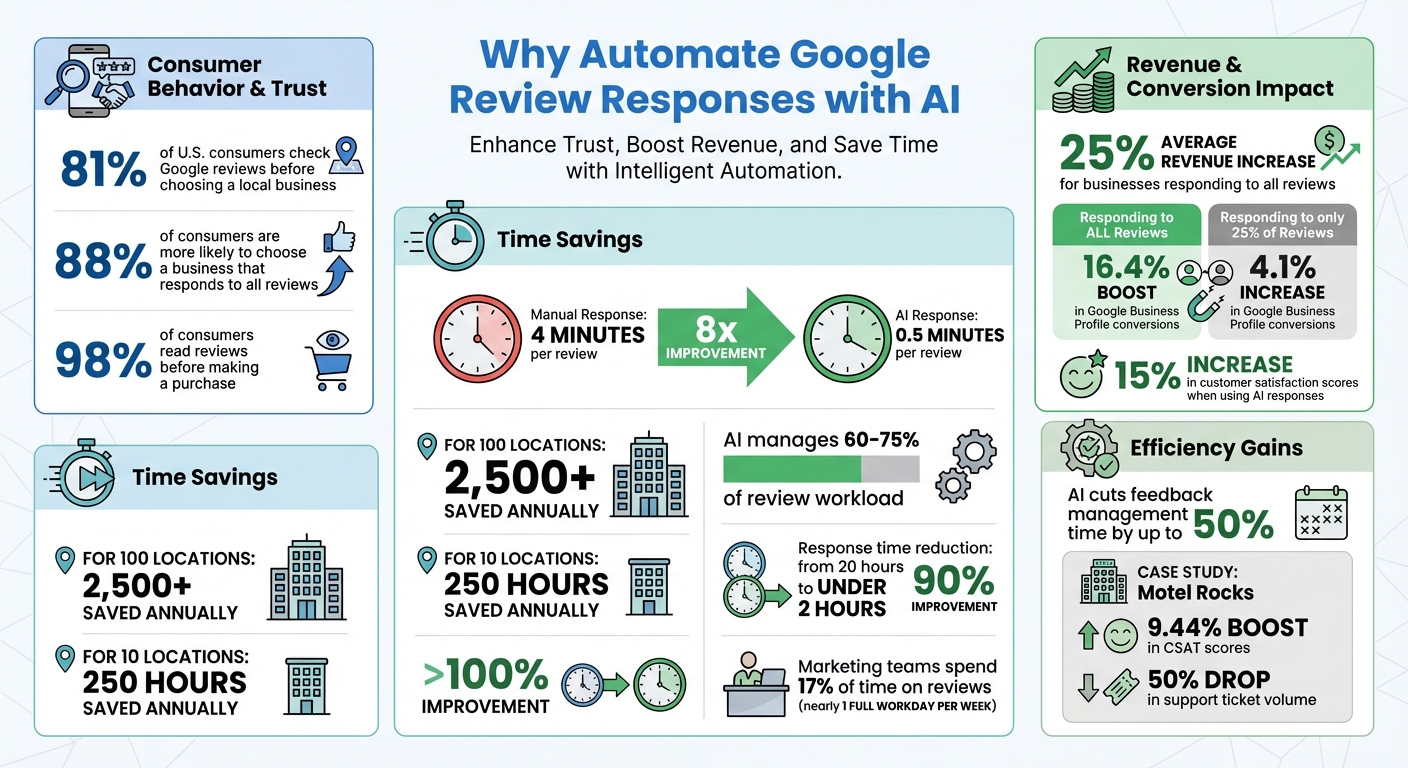
- 81% of U.S. consumers check Google reviews before choosing a local business.
- Businesses that respond to all reviews see an average revenue increase of 25%.
- Timely, personalized responses boost trust, improve local search rankings, and influence potential customers.
But manually replying to reviews is time-consuming, especially for businesses with multiple locations. AI tools simplify the process by:
- Saving time: AI reduces response time from 4 minutes to just 0.5 minutes per review.
- Maintaining consistency: AI ensures on-brand, professional replies for all reviews.
- Improving engagement: Businesses using AI report higher customer satisfaction and better conversions.
Platforms like GoHighLevel allow businesses to automate review responses, customize tone, and manage feedback efficiently - all while saving hours of work.
AI-Powered Google Review Response Statistics and Time Savings
How I Automated Google Reviews Using AI (Game-Changer for Businesses!)
Why Automate Review Responses with AI
Imagine your marketing team spending 17% of its time on reviews - that’s nearly an entire workday each week. AI can reclaim that time in an instant. Instead of being bogged down by repetitive tasks, your team could focus on strategy, acquiring new clients, or improving services. AI doesn’t just save hours; it transforms how you manage your reputation at scale without hiring more staff. Let’s dive into how AI simplifies review responses and why it’s a game-changer for growing your business.
Save Time and Scale Smarter
On average, it takes about 4 minutes to respond to a single review. AI slashes that to just 0.5 minutes per review - an 8x improvement. For businesses with 100 locations, this translates to saving over 2,500 hours annually - the equivalent of adding a full-time employee. Even with just 10 locations, you’re looking at reclaiming around 250 hours a year. AI manages 60%-75% of the review workload, ensuring every review gets a response.
Why does this matter? Businesses that respond to all reviews see a 16.4% boost in Google Business Profile conversions, compared to just a 4.1% increase for those responding to only 25% of reviews. AI empowers you to engage with every customer, not just the ones with the most pressing issues.
Plus, AI eliminates the dreaded blank page. It generates context-aware drafts instantly, leaving your team to simply fine-tune and personalize before posting. The result? Faster responses without sacrificing quality.
But speed isn’t the only benefit. Consistency in tone and personalization is key - here’s where AI truly shines.
Keep Responses Professional and Personal
Worried that AI will make your replies sound robotic? That’s where brand voice guidelines come in. By configuring AI to match your tone, you can ensure responses feel natural and aligned with your business’s personality. Advanced Natural Language Processing (NLP) technology analyzes the sentiment and context of each review, crafting replies that are both thoughtful and specific.
Unlike generic templates like “Thanks for your review!”, AI can reference details such as a product name or a specific concern while staying true to your brand’s style. Whether your business needs a polished tone for a law firm or a casual vibe for a coffee shop, AI ensures consistency across all locations and team members - a task nearly impossible to achieve manually.
Businesses using AI for review responses have reported a 15% increase in customer satisfaction scores because replies feel timely and genuine, not rushed or cookie-cutter. And for companies with international customers, AI can automatically respond in the customer’s language using NLP, eliminating the need for manual translation. That’s a huge advantage in today’s global market.
Build Trust and Keep Customers Coming Back
Timely, thoughtful responses don’t just save time - they build trust. While manual responses can take up to 20 hours, AI reduces that to under 2 hours - a 90% improvement. This speed allows you to address unhappy customers quickly, stopping negative sentiment before it spreads.
Trust is everything in business. In fact, 88% of consumers are more likely to choose a business that responds to all reviews. Engaging with feedback - especially negative reviews - shows customers you’re listening and that you care. As Yotpo explains:
When shoppers see a brand actively and thoughtfully responding to feedback, it sends a powerful message: we are listening and we care.
– Yotpo
AI also provides 24/7 responsiveness, so reviews posted during off-hours don’t go unanswered. This always-on approach not only prevents potential damage to your reputation but also signals to prospects that your business is attentive and engaged. And there’s a bonus: Google rewards frequent, keyword-rich responses by boosting your local search rankings.
In short, AI doesn’t take over your voice - it amplifies it. You remain in control of what gets posted, while AI handles the repetitive tasks, giving you more time to focus on what really matters: running your business.
How to Set Up AI Review Responses in GoHighLevel
Setting up AI review automation in GoHighLevel is simple and efficient. The platform brings everything together in one dashboard, so you’re not stuck switching between tools or accounts. Here’s how to get started.
Connect Your Google Business Profile to GoHighLevel
First, log in to your GoHighLevel Sub-Account dashboard. Go to Settings > Integrations, click Google, and sign in using an account with Owner or Manager rights for your Google Business Profile (GBP). This access level is crucial - without it, the connection won’t work.
Once authenticated, select the business locations you want to link. If you manage multiple locations, you can connect them all to one sub-account. After authorization, you’ll see a green Connected status under "Connected Pages." From here, reviews will automatically appear in the Reputation tab for tracking and in the Conversations tab for responding.
Pro tip: Enable GBP Call Tracking during setup. This feature lets you track and attribute calls made directly from your Google Search or Maps listing.
Turn On and Customize AI Auto-Responses
Navigate to the Reputation Management module, click the Settings tab, and select Reviews AI. You’ll have two options for response modes: Suggestive Mode (AI drafts responses for your approval) or Auto-Pilot Mode (AI sends responses automatically).
For hands-free automation, choose Auto-Pilot Mode. If you’re just getting started, Suggestive Mode allows you to test and fine-tune responses first. Set up an AI Agent by giving it a name, selecting a tone (Friendly, Professional, or Empathetic), and writing a short prompt that reflects your brand voice. For example, a dental practice might adopt a warm and reassuring tone.
You can assign different AI Agents to handle Positive, Neutral, and Negative reviews, ensuring that each sentiment is addressed appropriately. To make responses feel more natural, set a delay - around 30 minutes works well - before they’re sent. Add a personalized footer, such as “Thanks again, [Your Business Name],” to give responses a human touch.
Cost details: AI responses are priced at $0.01 per review. The first generation costs $0.01, and the next three responses are free. If you’re an agency, you can mark up these costs and pass them on to your clients.
Once your basic setup is complete, you can take it a step further by creating workflows for smarter review management.
Build Workflows for Smart Review Management
Workflows let you handle reviews strategically based on their sentiment. Use the Workflow Builder to sort reviews by star rating and trigger specific actions. For instance, a 5-star review could receive an automated thank-you message, while a 1- or 2-star review might trigger a Slack alert and a follow-up SMS.
To create a workflow, add the GPT Powered by OpenAI action. Use dynamic prompts like: “Generate a response to {{contact.name}} for their {{review.rating}}-star review. Mention {{business.name}} and thank them for their feedback.” This ensures every reply feels personalized by pulling customer details directly from your CRM.
Adjust the Sampling Temperature to control the AI’s tone and creativity. A lower value (e.g., 0.2) keeps responses consistent and on-brand, while a higher value (e.g., 0.8) introduces more variety. If replies start sounding repetitive, try increasing the temperature slightly.
Test and Refine Your Setup
Run sample reviews through the system to see how well the AI-generated responses align with your brand voice. Use Suggestive Mode to preview responses before they’re sent. Check the Reputation Dashboard to track sentiment analysis and average ratings by location. This data helps you identify areas needing improvement.
After one to two weeks, review the results. Look for signs of better customer engagement and quicker resolution of negative feedback. Use what you learn to tweak your AI prompts, adjust response times, or refine workflows. Remember, this is a process of continuous improvement.
Here’s a key takeaway: 88% of consumers are more likely to choose a business that responds to reviews. Automating responses isn’t just a time-saver - it’s a way to build trust and strengthen your reputation at scale.
sbb-itb-f031672
GoHighLevel vs Other Review Automation Tools
For businesses aiming to streamline review management while also tackling broader marketing needs, finding a tool that consolidates multiple functions is a game-changer. If you've been exploring review automation tools, names like Birdeye, Podium, or ReviewTrackers have likely popped up. While these tools focus exclusively on managing reviews, GoHighLevel takes it a step further by combining review management with a full CRM, funnel builder, and multi-channel communication system.
Why does this matter? Because agencies and service-based businesses need more than just a way to manage reviews. They need tools that can help them capture leads, follow up with prospects, schedule appointments, and nurture customer relationships - all without juggling multiple platforms. Using standalone tools often means piecing together systems like Calendly, Mailchimp, and ClickFunnels, which not only increases costs but also creates data silos that can slow you down.
Feature Comparison: GoHighLevel vs Competitors
The advantage of GoHighLevel's all-in-one approach becomes even clearer when you compare its features directly with those of its competitors.
| Feature | GoHighLevel | Birdeye | Podium | ReviewTrackers |
|---|---|---|---|---|
| Built-in CRM | Yes | No | No | No |
| White-Label Capabilities | Full | No | No | Limited |
| Multi-Channel Automation | SMS, Email, Funnels | Reviews + Listings | Messaging-focused | Reviews only |
| Workflow Triggers | Advanced | Basic | Basic | Basic |
| Pricing Model | Flat-rate ($97–$297/mo) | High/Tiered | High ($399/mo) | Custom pricing |
| AI Integration | Reviews AI + Voice AI | Limited | Limited | Limited |
If you only need review management, tools like Birdeye and Podium can work well. But they fall short when it comes to replacing a full marketing stack. GoHighLevel, on the other hand, is designed for agencies and small-to-medium businesses (SMBs) that prioritize efficiency and consolidation. With a 9.2/10 rating on G2 for Features, it has become a trusted choice for over 15,000 agencies and 500,000+ businesses as of 2025.
Why Agencies and SMBs Choose GoHighLevel
Agencies and SMBs are drawn to GoHighLevel because it simplifies their tech stack and reduces costs. By replacing multiple subscriptions with a single, integrated platform priced between $97 and $297 per month, businesses save significantly compared to alternatives like Podium ($399/mo) or Birdeye ($299/mo). Plus, GoHighLevel offers features that competitors often lack, such as a built-in CRM.
One standout feature for agencies is the platform's 100% white-label capability. This allows agencies to rebrand the software and resell it to clients under their own branding, creating an additional revenue stream. Most competitors don't offer this level of customization. A consultant on Capterra highlighted this benefit:
HighLevel felt like having a full-time team automating our emails, SMS, and follow-ups.
While there is an initial learning curve, GoHighLevel's consolidated features pay off in the long run. It automates everything from review responses and missed call follow-ups to appointment scheduling and lead nurturing - all seamlessly triggered by review activity.
Start your 14-day free trial of GoHighLevel and discover how this all-in-one platform can transform your customer engagement strategy.
Track Results and Best Practices
Automating review responses is just the first step; tracking performance and refining your strategy is where the real value comes in. To get the most out of your efforts, focus on accuracy by cross-checking AI-generated drafts with your business details before publishing. While AI review tools can cut feedback management time by up to 50%, this only works if you're monitoring the right metrics. These metrics help you adjust and improve automated responses to better engage with customers.
Metrics to Monitor
Keep an eye on key metrics like response acceptance rate (aim for over 70%), average response time (under 24 hours), and review response rate (100% for 4- and 5-star reviews). Other important indicators include changes in your average star rating, Customer Satisfaction Score (CSAT), and Net Promoter Score (NPS). For example, in 2024, the online fashion retailer Motel Rocks used Zendesk Copilot for sentiment analysis and automated feedback handling. This led to a 9.44% boost in CSAT scores and a 50% drop in support ticket volume.
Also, pay attention to patterns in follow-up questions. If customers frequently ask for clarification after receiving an AI-generated response, it’s a clear sign that the replies aren’t as helpful as they should be.
How to Personalize Automated Responses
Once you've identified the key metrics, the next step is to fine-tune your responses for a personal touch. AI drafts should include specific details whenever possible. For example, replace generic terms like "your order" with something more precise, such as "your new leather jacket". A human-in-the-loop process can help ensure this level of personalization.
For negative reviews (1–3 stars), set up sentiment-based workflows to route them directly to a human team member for immediate attention. Meanwhile, let AI handle routine positive reviews.
Another tip: schedule automated replies to go out after a short delay - anywhere from 15 minutes to 3 days. This delay makes the interaction feel more natural and less robotic. Finally, feed your AI system with specific business details, like parking instructions, seasonal promotions, or return policies, so it can provide accurate and relevant information.
Use Automation to Keep Clients Longer
Beyond efficiency and personalization, automated review management helps deepen client relationships. For agencies, offering this as a managed service to small and medium-sized businesses ensures a 100% response rate without adding manual work. It also creates a steady revenue stream. For example, GoHighLevel's Reviews AI costs about $0.01 per review response, making it easy for agencies to mark up the service by 2x or 3x while still offering great value.
By helping clients maintain consistent and automated engagement, you position yourself as an essential partner. Use AI analytics to track specific areas mentioned in reviews - like "customer service" or "menu variety" - and include those insights in monthly reports to showcase your impact.
Start your 14-day free trial of GoHighLevel and turn review management into a tool for building lasting client relationships.
Conclusion
Using AI to automate Google review responses creates a reputation management system that operates nonstop - an essential feature when 98% of consumers read reviews before making a purchase, and 88% favor businesses that respond to all reviews. With AI, context-aware drafts are generated instantly, cutting response times in half and ensuring every customer feels acknowledged, day or night.
This approach thrives on the balance of speed and personalization. AI takes care of the groundwork by drafting context-specific responses, while your team refines them to maintain a human touch, avoiding robotic-sounding replies. This strategy has led to impressive outcomes, including noticeable increases in repeat business. Combining quick, tailored responses with a personal touch sets the foundation for leveraging integrated platforms effectively.
For agencies and small businesses managing several clients or locations, GoHighLevel provides a streamlined solution. It merges time-saving automation with personalization into a single, unified platform. Instead of juggling multiple tools for CRM, workflows, and review management, everything is consolidated. The initial learning curve is well worth it when you can ensure every review is addressed effortlessly, while also creating an opportunity to turn this capability into a recurring revenue source for your agency.
This is the moment to transition from reactive to proactive reputation management. As Vendasta aptly states:
AI shifts reputation management from maintenance to momentum. – Vendasta
Thoughtfully responding to feedback sends a clear message to both customers and search engines: your business is active, engaged, and trustworthy. These are qualities that directly influence local search rankings and conversion rates. By embracing AI-driven review responses, businesses can enhance efficiency, build stronger customer relationships, and drive growth.
Start your 14-day free trial of GoHighLevel, set up your first automated workflow, and let AI-powered responses take your reputation management to the next level.
FAQs
How does AI help create consistent and personalized responses to Google reviews?
AI helps maintain consistency by crafting responses that reflect a steady tone and stay true to your brand's voice across all reviews. At the same time, it boosts personalization by analyzing the sentiment and specifics of each review. This allows for tailored replies that directly address individual feedback or concerns, making responses more meaningful and relatable - all while saving your team valuable time.
What does it cost to use AI for automating Google review responses?
The price of using AI tools to automate Google review responses varies based on the platform and subscription plan you select. Many services start at around $80 per month for managing a single review profile. If you need to handle multiple profiles, higher-tier plans are available. Some tools may also include extra costs, like API fees or charges per review, depending on the provider.
While there is an initial expense, these AI tools can free up a lot of time - often saving businesses 15–20 hours per week by automating responses. For small to mid-sized businesses, this efficiency boost and enhanced customer interaction often translate into a solid return on investment over time.
How does GoHighLevel stack up against other tools for automating review responses?
GoHighLevel is crafted as an all-in-one platform tailored for agencies and small businesses. It combines features like AI-powered automated responses, sentiment-based customization, multi-language capabilities, and smooth integration with other platforms. These tools not only save time but also ensure businesses maintain a professional and personalized approach to managing reviews.
With a price tag of $97 per month, GoHighLevel often proves to be more budget-friendly than using multiple standalone tools, which might require extra subscriptions for similar features. Its emphasis on automation, scalability, and reputation management makes it an appealing option for businesses aiming to simplify their processes and boost their return on investment.