Marketing Automation for Dentists: How to Fill Your Schedule Without Chasing Patients
By HL Max20 min read
Automation can solve the biggest challenges dental practices face - missed appointments, inactive patients, and inconsistent follow-ups - while reducing staff workload. Automated tools like appointment reminders, missed-call text-backs, and review requests can:
- Cut no-shows by 20-30%.
- Reactivate inactive patients with personalized recall workflows.
- Boost your online reputation, as 72% of patients won't consider clinics with less than 4-star ratings.
Using an all-in-one platform like GoHighLevel simplifies operations by consolidating scheduling, reminders, patient communication, and reviews into a single system. This eliminates the need for multiple tools, saves time, and ensures every step of the patient journey is optimized for efficiency. With automation, your practice can maintain a full schedule without chasing patients.
How to Use GoHighLevel for Dentists (2026)
The Dental Patient Journey and Where Automation Fits
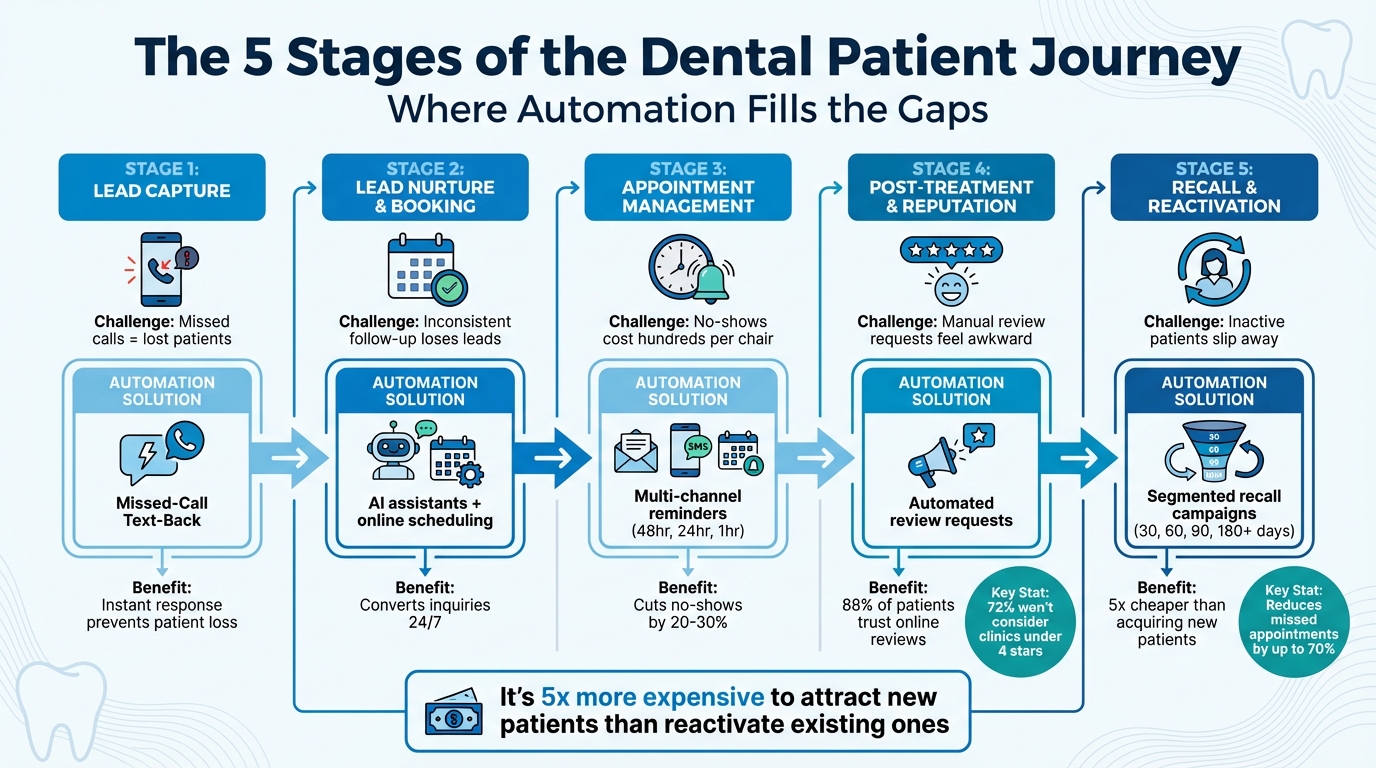
5 Stages of the Dental Patient Journey with Automation Solutions
Every dental patient embarks on a journey - from their first interaction with your practice to their routine six-month checkups. Each stage of this journey requires attention and follow-up, which can quickly overwhelm your team. A missed call or a forgotten recall reminder can lead to lost revenue and empty chairs. And when patients don't leave reviews, your practice becomes invisible to those searching for a dentist online.
Pinpointing where patients drop off allows you to implement automation at the moments it matters most. Here's a key fact: it's far more expensive to attract new patients than it is to reactivate existing ones. Yet, many practices focus heavily on bringing in new leads while inactive patients quietly slip away. The solution isn't to work harder - it's to set up systems that do the heavy lifting for you. With this understanding, let's explore how automation can streamline each step of the dental patient journey.
The 5 Stages of the Dental Patient Journey
The patient journey can be broken into five distinct stages, each with its own hurdles.
Stage 1: Lead Capture
When a potential patient calls your office or submits a contact form, speed is everything. If the front desk is busy and misses the call, that potential patient might move on to another dentist without hesitation.
Stage 2: Lead Nurture & Booking
This is the phase where patients decide whether to book an appointment. Inconsistent follow-up can cost you valuable leads. For instance, a patient might inquire about Invisalign on Monday but forget about it by Wednesday if there's no follow-up - leaving you with a missed opportunity.
Stage 3: Appointment Management
Between booking and the actual visit, no-shows can take a serious toll on your revenue. An unfilled chair can mean hundreds of dollars lost, often because patients forget their appointments or don't prioritize them.
Stage 4: Post-Treatment & Reputation
Once a patient leaves your office, their experience is still fresh. This is the ideal time to ask for a review. However, requesting reviews in person can feel awkward, and relying on manual follow-ups often leads to missed opportunities.
Stage 5: Recall & Reactivation
Patients need reminders for their six-month cleanings or follow-ups if they haven't been back in over 90 days. Many practices struggle to manually track and reach out to these inactive patients, leaving a huge gap in potential revenue.
By automating these stages, you can streamline operations and ensure every patient interaction contributes to a fuller schedule.
What to Automate at Each Stage
Automation offers tailored solutions for each stage of the patient journey, saving time while improving the overall experience.
- Lead Capture: Use a Missed-Call Text-Back feature to instantly send a message like, "Sorry we missed your call - how can we help?" This ensures potential patients don’t move on to competitors. Tools like SMS webchat widgets and Google Business Profile integration can also provide instant responses, even after hours.
- Lead Nurture & Booking: AI assistants and online scheduling tools can convert inquiries into booked appointments 24/7. These systems sync with your provider's real-time availability, making the process seamless.
- Appointment Management: Digital intake forms allow patients to submit insurance details and medical history ahead of time, cutting down on waiting room delays. Multi-channel appointment reminders - sent 48 hours, 24 hours, and 1 hour before appointments - help minimize no-shows.
- Post-Treatment: Automated review requests are key. After marking an appointment as "completed", a text or email can be sent within a couple of hours asking for feedback. Since 88% of patients trust online reviews as much as personal recommendations, this step directly impacts your ability to attract new patients. Automated post-treatment check-ins, like "How is the new crown feeling?" also enhance patient care.
- Recall & Reactivation: Automated campaigns can segment inactive patients based on how long it's been since their last visit - 30, 60, 90, or even 180+ days - and send customized messages to bring them back. Seasonal campaigns, such as year-end reminders about unused insurance benefits, can also help fill your schedule with familiar faces.
| Patient Journey Stage | Automation Solution | Primary Benefit |
|---|---|---|
| Lead Capture | Missed-Call Text-Back | Prevents lost revenue from unanswered calls |
| Booking | AI Conversation Assistant | Converts leads 24/7 without staff involvement |
| Before Visit | Digital Intake Forms | Reduces waiting room delays and manual work |
| Arrival | SMS/Email Reminders | Minimizes no-show rates |
| After Visit | Automated Review Requests | Improves online visibility and local SEO |
| Retention | Recall Workflows | Keeps your schedule consistently full |
"Operations is where the patient experience lives or dies. Your ads, content, and reviews might attract people - but it's your systems that make them stay." - GoHighLevel Operations Playbook
The bottom line? Using separate tools for scheduling, reminders, and reviews creates unnecessary manual work for your team. An all-in-one platform that integrates these processes can truly elevate your operations, ensuring every stage of the patient journey is covered efficiently.
How to Cut No-Shows with Automated Appointment Systems
Missed appointments can be a major headache for any practice. They not only leave empty chairs but also chip away at revenue. Most of the time, though, patients don’t skip intentionally - they simply forget or fail to prioritize the appointment due to a lack of reminders.
The good news? You don’t need to overload your staff with reminder calls. Automated systems that handle confirmations, reminders, and last-minute check-ins can significantly cut down on no-shows while allowing your front desk team to focus on in-office patients.
Setting Up Your Dental Scheduling System
A well-organized calendar is the backbone of an efficient schedule. Start by dividing your calendar by appointment type. For example, create separate slots for cleanings, new patient exams, crown fittings, and emergencies. This structure ensures proper time allocation and avoids double-booking or other scheduling conflicts.
To keep things running smoothly, build in 10-minute buffer times between appointments. These small gaps help absorb any delays, so one running-late patient doesn’t derail your entire day. It’s also a good idea to set a same-day cutoff for new bookings, requiring some advance notice before patients can schedule.
Another must? Sync your providers’ availability in real time. If Dr. Smith only works Tuesday through Thursday, her calendar should automatically reflect that. Tools like GoHighLevel’s smart calendar system let you embed booking links on your website, Google Business Profile, and landing pages, making it easy for patients to schedule anytime. You can even integrate payment processing through Stripe to collect deposits at the time of booking - a simple way to increase patient commitment and reduce cancellations .
Once your calendar is optimized, the next step is ensuring patients get timely reminders to keep their appointments.
Automated Reminders That Actually Work
A solid scheduling system is only half the battle. The other half? Sending reminders that keep patients informed and committed. Here’s how to make it happen:
- Immediate confirmation (via SMS/email): Locks the date into the patient’s mind and adds a calendar invite.
- 48-hour SMS reminder: Gives enough time to reschedule if needed, so you can fill the slot.
- 24-hour email: Provides detailed instructions, parking info, or pre-visit forms.
- 1-hour SMS reminder: Shares last-minute details like suite numbers or parking directions.
"Most no-shows happen because of poor communication or forgetfulness." - GoHighLevel Operations Playbook
Tailor these reminders to the type of appointment. For instance, a crown fitting might require different instructions than a routine cleaning. If sedation is involved, the 24-hour email could include fasting guidelines, while a new patient exam might include a link to fill out medical history forms. This level of detail helps patients feel prepared and reduces confusion.
| Reminder Type | Timing | Channel | Purpose |
|---|---|---|---|
| Confirmation | Immediate | SMS/Email | Confirms the booking and adds a calendar invite |
| First Reminder | 48 Hours Before | SMS | Nudges patients to reschedule if necessary |
| Second Reminder | 24 Hours Before | Includes instructions and pre-visit forms | |
| Final Nudge | 1 Hour Before | SMS | Shares parking info and a "see you soon" message |
Make sure to include one-click rescheduling links in your reminders. This feature makes it easy for patients to adjust their appointments without calling, reducing no-shows and cutting down on front desk workload .
With reminders in place, there’s still one more tool to help secure appointments: instant text responses.
Missed-Call Text-Back for Instant Response
When your front desk is tied up and misses a call, the Missed-Call Text-Back feature steps in automatically .
Here’s how it works: the system sends a text like, "Hi! You’ve reached [Your Practice Name]. Sorry we missed your call. How can we help you schedule an appointment?" The conversation is logged in your CRM, letting patients respond via text - a method many prefer over waiting on hold or leaving a voicemail.
For high-priority or VIP patients, you can set up internal alerts so your team gets notified immediately when a missed call needs urgent follow-up. This ensures no important lead slips through the cracks.
GoHighLevel’s Missed-Call Text-Back integrates seamlessly with your phone system. It detects missed calls, sends a quick text, and logs the interaction in your CRM. Combined with smart scheduling and automated reminders, this feature ensures no patient inquiry goes unanswered.
Converting New Leads with Automated Follow-Up
When a potential patient contacts your dental practice through your website or by phone, acting quickly is essential. Studies reveal that 80% of sales require at least five follow-ups to close, yet nearly half of sales reps stop after just one attempt. For dental offices, this means countless opportunities are lost simply because follow-ups aren’t consistent.
Instead of hiring additional staff to manage leads, consider using automated workflows. These systems ensure timely follow-ups across multiple channels, freeing up your team to focus on other tasks.
Capturing Leads from Your Website and Ads
After initiating a follow-up, the next priority is capturing your leads effectively. One way to do this is by integrating SMS Webchat widgets into your website. Unlike traditional forms, these widgets turn website visitors into active conversations instantly. For example, if someone inquires about Invisalign or teeth whitening, they’ll receive an immediate reply - even if your front desk team is tied up.
If you’re running Google Ads or Facebook campaigns, direct traffic to specific landing pages tailored to the service being promoted. For example, a cosmetic dentistry ad should lead to a page dedicated to veneers or whitening, not to your homepage. Tools like GoHighLevel's form builder can help you create detailed intake forms that gather not just contact information, but also details about the patient’s treatment interests, insurance status, and dental concerns. Each form submission can be tagged - for instance, "Cosmetic Interest" or "Emergency" - to trigger the appropriate follow-up sequence.
Don’t overlook the potential of Google Business Profile chat. Many patients discover dental practices through Google Maps, and enabling chat on your profile allows you to capture leads who might otherwise contact a competitor.
Building Multi-Channel Follow-Up Sequences
Once you’ve captured a lead, speed is crucial. Send an immediate confirmation via SMS or email to acknowledge their inquiry and provide a direct booking link. This initial response not only demonstrates your responsiveness but also sets a positive tone.
However, one message isn’t enough. A well-structured, multi-channel follow-up sequence can guide leads toward booking an appointment. Here’s a sample framework that balances persistence with value:
| Follow-Up Stage | Timing | Channel | Objective |
|---|---|---|---|
| Instant Response | Immediate | SMS/Email | Confirm inquiry and share booking link |
| Educational Content | Day 3 | Introduce team or share treatment info | |
| Social Proof | Day 5 | SMS | Share patient testimonials or photos |
| Address Objections | Day 7 | Explain insurance or financing options | |
| Final Nudge | Day 10 | SMS | Offer a limited-time new patient deal |
This approach keeps your practice top of mind without overwhelming potential patients. Using multiple channels is key - some people prefer text messages, while others are more likely to engage with emails.
With GoHighLevel’s workflow builder, setting up these sequences is straightforward. Once created, these workflows operate automatically for every new lead. For high-priority leads, you can add an internal alert prompting your treatment coordinator to make a personal phone call within 24 hours, blending automation with a personal touch.
"A workflow helps you complete repetitive tasks. You set it up once and it runs without your action required. It saves you SO much time and always allows you to truly scale your time." - HighLevel
After streamlining your follow-up process, tailoring your messages based on lead type can further improve conversion rates.
Segmenting Leads by Treatment Type and Need
Automated follow-ups are just the beginning. Personalizing communication ensures that each lead gets the information they’re looking for. A patient with a dental emergency needs a different approach than someone exploring cosmetic options like veneers.
Start by tagging leads based on their inquiries. For instance, label someone asking about Invisalign as "Ortho Interest" or a patient expressing dental anxiety as "Anxious Patient." These tags can trigger tailored workflows, such as sending sedation dentistry options to anxious patients or cosmetic treatment videos to those interested in veneers.
GoHighLevel’s conditional logic feature allows you to create branching workflows that adapt to each lead’s needs. A "Cosmetic Interest" lead might receive emails with before-and-after photos and treatment details, while a "Routine Cleaning" lead might get reminders about insurance coverage and hygiene appointments. This personalization makes your communication feel relevant and engaging.
You can also segment leads by their source. For example, a patient who clicked on a Facebook ad for a "$99 New Patient Special" may be more price-conscious than someone referred by an existing patient. Adjust your messaging accordingly - price-sensitive leads might appreciate information about financing options, while referred patients may respond better to details about your advanced equipment or patient care approach.
Finally, use digital intake forms to pre-qualify leads before they visit your office. Include questions about their dental history, current concerns, and insurance details. Based on their responses, you can route them to the appropriate calendar (e.g., a new patient exam or emergency slot) and assign a team member to follow up. By the time they book, your staff will already have a clear understanding of their needs.
sbb-itb-f031672
Keeping Patients Coming Back with Recall and Reactivation
Automated recall systems are game-changers for turning inactive patients into active ones. Many practices lose track of patients who disappear from the schedule after six months or a year. Instead of piling more work on your staff with manual calls, automated systems can keep patients engaged effortlessly.
Automating 6-Month Recall Reminders
Automated recall systems use Smart Lists to send reminders based on the last appointment date - whether it’s 30, 60, 90, or 180+ days ago. Once a patient reaches that timeframe, they’re automatically added to a reminder sequence.
Using both SMS and email increases engagement and reduces no-shows. For example, a patient who hasn’t been in for five months might get a text saying: “Hi [Name], it’s been almost six months since your last visit. Ready to schedule your next cleaning?” This message includes a direct booking link so they can schedule anytime - no need to call your office. It’s all about removing barriers and making it convenient for patients to book.
Personalization is key. Including the patient’s name and referencing their treatment history makes these reminders feel more like a thoughtful check-in than a generic marketing message. The result? Automated reminders can reduce missed appointments and no-shows by up to 70%, keeping your schedule full without adding extra work for your team.
While automation ensures patients stay consistent with routine care, reactivating those who’ve been away longer takes a more tailored approach.
Bringing Back Inactive Patients
Patients who haven’t visited in over a year represent a big opportunity for many practices. These aren’t strangers - they’ve already experienced your care. They just need a little encouragement to return.
Start by segmenting inactive patients based on how long they’ve been away, and set up automated sequences for each group. Tags like "Overdue 3 Months" or "Hygiene Reactivation Needed" can help trigger the right follow-up messages.
The tone of your messaging should create a sense of urgency without being too pushy. Here are some effective campaign ideas:
| Campaign Type | Messaging Hook | Best Use Case |
|---|---|---|
| Soft Reminder | "Just checking in... ready for your next cleaning?" | Patients 30–60 days inactive |
| Friendly Re-offer | "$25 credit for returning patients who've been away" | Patients 90+ days inactive |
| Treatment Follow-up | "Your last visit showed a cavity... let’s treat it now" | Patients with unfinished procedures |
| Year-End Benefits | "Use your insurance benefits before they reset" | Q4 campaigns for overdue patients |
| Birthday Gift | "A birthday whitening gift just for you" | Annual outreach to all patients |
The Year-End Benefits campaign works especially well in Q4, reminding patients to use their insurance benefits before they expire. For patients with unresolved treatment plans, such as an untreated cavity, send targeted follow-ups emphasizing the risks of delaying care.
You can also add conditional logic to your workflows. For instance, if a patient clicks the booking link but doesn’t schedule, the system can send a follow-up nudge a few days later. For high-priority cases, flag your front desk team to make a quick call if the patient doesn’t respond after two automated messages.
Automating Review Requests After Appointments
Your online reputation plays a huge role in attracting new patients. 88% of patients trust online reviews as much as personal recommendations, and 72% won’t consider a clinic with less than 4 stars. Yet, many practices struggle to collect reviews consistently because it’s easy to forget or feels awkward to ask.
Automate review requests right after appointments to capture fresh impressions. A simple text like, “Hi [Name], thanks for visiting us today! We’d love to hear about your experience. Could you leave us a quick review?” with a direct link to your Google Business Profile makes it easy.
Automated review gating can also help. It directs satisfied patients to public review sites while routing concerns internally. This way, you protect your online reputation while still gathering valuable feedback.
"A great reputation isn’t built by chance - it’s built by design." - GoHighLevel
Platforms like GoHighLevel can handle these workflows automatically, so your team doesn’t have to remember to ask. Over time, this steady stream of reviews boosts your local search rankings and helps attract new patients.
To make the process even smoother, mention the review request during the appointment. A quick, “You’ll get a text later asking about your visit - we’d really appreciate your feedback,” makes the automation feel more personal and increases response rates. This small touch can make a big difference in how patients perceive your follow-up.
Building Your Dental Tech Stack Around GoHighLevel
Running a dental practice often means juggling 4–5 software subscriptions just to handle marketing and patient communication. You might use Mailchimp for emails, Calendly for scheduling, Podium for reviews, and perhaps a CRM like HubSpot to track leads. The problem? Each tool comes with its own login, monthly fee, and learning curve. Even worse, these platforms don’t communicate with each other, leaving your team stuck switching between tabs and manually transferring data.
To simplify your operations, start by identifying the automation features that are absolutely necessary for your practice.
What to Look for in Dental Marketing Automation
The goal is to consolidate tools and prioritize integrations. Fewer platforms mean fewer headaches, fewer errors, and lower expenses. Look for a system that can manage SMS, email, appointment reminders, review requests, and lead tracking - all in one place.
Another critical factor is HIPAA compliance. Any platform that handles patient information must meet federal privacy standards, including encrypted data handling and a Business Associate Agreement (BAA).
It’s also worth evaluating a platform’s automation capabilities. Can it send reminders tied to appointment dates? Automatically segment patients based on their last visit or treatment type? Respond to missed calls without manual intervention? These features can streamline patient communication, reduce no-shows, and save your team valuable time.
Why GoHighLevel Works for Dental Practices
GoHighLevel eliminates the need for multiple subscriptions by combining everything - SMS, email, scheduling, CRM, review management, and even social media posting - under one roof. With a single login and a predictable monthly cost, it simplifies your tech stack.
One standout feature is the Conversations tab, which consolidates all patient interactions - texts, emails, Facebook messages, and phone calls - into a single thread. Your front desk team no longer has to bounce between different inboxes or wonder if someone already replied. They can see the entire history of communication in one place and respond instantly.
Here’s how GoHighLevel can replace multiple tools in a typical dental practice:
| Feature | Replaces These Tools | Dental Practice Benefit |
|---|---|---|
| Smart Calendars | Calendly, Appointy | Syncs provider availability and automates reminders |
| Reputation Manager | Podium, Birdeye | Automates Google/Facebook review requests post-visit |
| Email/SMS Marketing | Mailchimp, Constant Contact | Runs recall and reactivation campaigns |
| Funnel Builder | ClickFunnels, Unbounce | Creates landing pages for Invisalign or implant ads |
| Social Planner | Hootsuite, Buffer | Schedules posts like dental tips and team spotlights |
| CRM & Pipelines | HubSpot, Salesforce | Tracks patient progress from "New Lead" to "Completed" |
GoHighLevel also includes a Missed Call Text-Back feature, which automatically sends a text to patients when a call goes unanswered. This small but powerful tool can keep potential patients from dialing your competitors. Plus, the platform offers Dental Snapshots - pre-built templates with booking funnels, follow-up sequences, and scheduling forms - so you can get your system up and running in just hours.
"Integrating our GHL with dental practice management systems just made landing deals with dental practices so much easier. Not having to ask your client for an export of their entire patient database just for a database reactivation campaign is a game-changer." - Beant Singh, Wahi Digital Marketing
GoHighLevel’s features integrate seamlessly with your existing clinical systems, making it an excellent addition to your tech stack.
Using GoHighLevel Alongside Your Practice Management Software
GoHighLevel isn’t designed to replace your practice management software (PMS); instead, it works alongside it. While your PMS handles clinical records and billing, GoHighLevel focuses on automating marketing and patient communication.
The key is bi-directional data syncing. Appointments booked through GoHighLevel sync directly with your PMS, and completed appointments can trigger workflows for review requests and recall reminders. This integration prevents double-booking and eliminates the need for manual data entry.
GoHighLevel integrates with popular practice management systems like Dentrix, Eaglesoft, and Open Dental. These integration packages cost $95 per month per integration, plus a $115 setup fee, with a 7-day trial available. Alternatively, an annual package is available for $1,026 per year, offering a 10% discount and no setup fee. The integration ensures real-time availability for online booking and syncs patient contact information automatically, so your team never has to deal with exporting and importing spreadsheets again.
"The level of service we've been able to provide with this integration has given our company the competitive edge we needed to stand out in the dental marketing world." - Jennifer Rutland, Dental Marketing
This setup allows you to keep your clinical workflows intact while significantly upgrading your marketing and communication systems. Your clinical team can stick with the software they’re familiar with, while your front desk benefits from a unified dashboard that simplifies patient interactions.
Conclusion
Marketing automation does more than just save time - it transforms how your dental practice runs. Instead of your front desk team spending hours making confirmation calls, chasing reviews, or reaching out to inactive patients, these tasks can operate seamlessly in the background. That means your staff can focus on what truly matters: providing outstanding care and building stronger connections with your patients.
The financial benefits are hard to ignore. Automated reminders can cut missed appointments by as much as 70%. Plus, it’s far more cost-effective to reactivate an existing patient than to acquire a new one - up to five times cheaper, in fact. When you combine fewer no-shows, consistent recall efforts, and quick follow-ups, you create a steady flow of revenue for your practice.
From a patient’s perspective, automation enhances their experience. They can book appointments anytime, without waiting for a callback. They’ll appreciate timely reminders that fit their schedules and immediate responses during busy hours. These small yet impactful conveniences make your practice feel modern, efficient, and highly professional.
GoHighLevel brings everything together - scheduling, reminders, lead follow-ups, review requests, and patient reactivation - into a single, easy-to-use platform. With just one login and a predictable monthly cost, you can streamline your operations. If you’re managing multiple tools and still struggling to keep your calendar full, it might be time to explore a 14-day free trial.
Thriving practices don’t just work harder - they work smarter. Automation gives you the tools to stay ahead.
FAQs
How does marketing automation help reduce missed dental appointments?
Marketing automation plays a key role in cutting down missed appointments by sending timely SMS and email reminders to patients. These automated notifications keep patients informed about their upcoming visits, giving them the chance to confirm or reschedule if necessary. The result? A noticeable drop in no-shows.
By taking manual follow-ups off your staff's plate, automation frees up valuable time while offering a smoother, hassle-free experience for patients. This forward-thinking method doesn't just keep your schedule running efficiently - it also boosts patient satisfaction and encourages long-term loyalty.
How can GoHighLevel help dentists streamline their marketing and keep their schedules full?
GoHighLevel makes dental marketing a breeze by bringing all the essential tools into one user-friendly platform. Instead of juggling several software subscriptions, dentists can handle everything - patient records, lead tracking, appointment scheduling, and automated follow-ups - all from a single, streamlined dashboard. This not only saves time and money but also eliminates the frustration of constantly switching between systems.
Key features like automated appointment reminders, missed-call text responses, and 24/7 lead capture through SMS or web chat help keep your schedule full and reduce no-shows. On top of that, built-in tools for review collection and reputation management make it simple to build a strong online presence, transforming satisfied patients into loyal advocates. By simplifying daily operations, GoHighLevel allows dentists to focus on what matters most: providing excellent patient care while seeing quicker returns on their marketing efforts.
How can automation help bring back inactive dental patients?
Automation makes it easier for dentists to reconnect with patients who haven’t been in for a while. By identifying these inactive patients, automated systems can send out personalized reminders through email or SMS. These messages might include appointment invitations, special promotions, or even helpful wellness tips to spark interest and encourage patients to schedule their next visit.
This approach not only saves dentists time but also helps keep their schedules full and strengthens relationships with patients - all without the need for time-consuming manual follow-ups.