How to Let AI Book Appointments for You Over Text Message
By HL Max11 min read
If you’re still scheduling appointments manually, you’re likely losing time, revenue, and potential customers. AI-powered text message booking solves this by automating the process and responding to leads in seconds - 24/7. Here’s what this means for your business:
- Faster Response Times: AI replies to inquiries in under 10 seconds, compared to hours or days with manual systems.
- 24/7 Availability: AI captures leads even after business hours, when 80% of callers won’t leave a voicemail.
- Fewer Errors: Automated systems prevent double-bookings and missed follow-ups.
- Higher Conversions: Businesses using AI booking tools report up to a 68% conversion rate, adding thousands in monthly revenue.
GoHighLevel is a platform that simplifies this process by combining SMS automation, calendar management, and AI agents into one system. Unlike fragmented tools like Calendly or HubSpot, it offers an all-in-one solution that reduces costs and improves efficiency. Whether you’re running a med spa, dental clinic, or marketing agency, AI booking can save time, reduce no-shows, and help you scale operations effectively.
Let’s dive into how to set up AI-powered appointment booking and why GoHighLevel is the best tool for the job.
This New AI Tool Just Made Appointment Booking Completely Automated (Insane!)
Why GoHighLevel Works Best for AI Text Appointment Booking
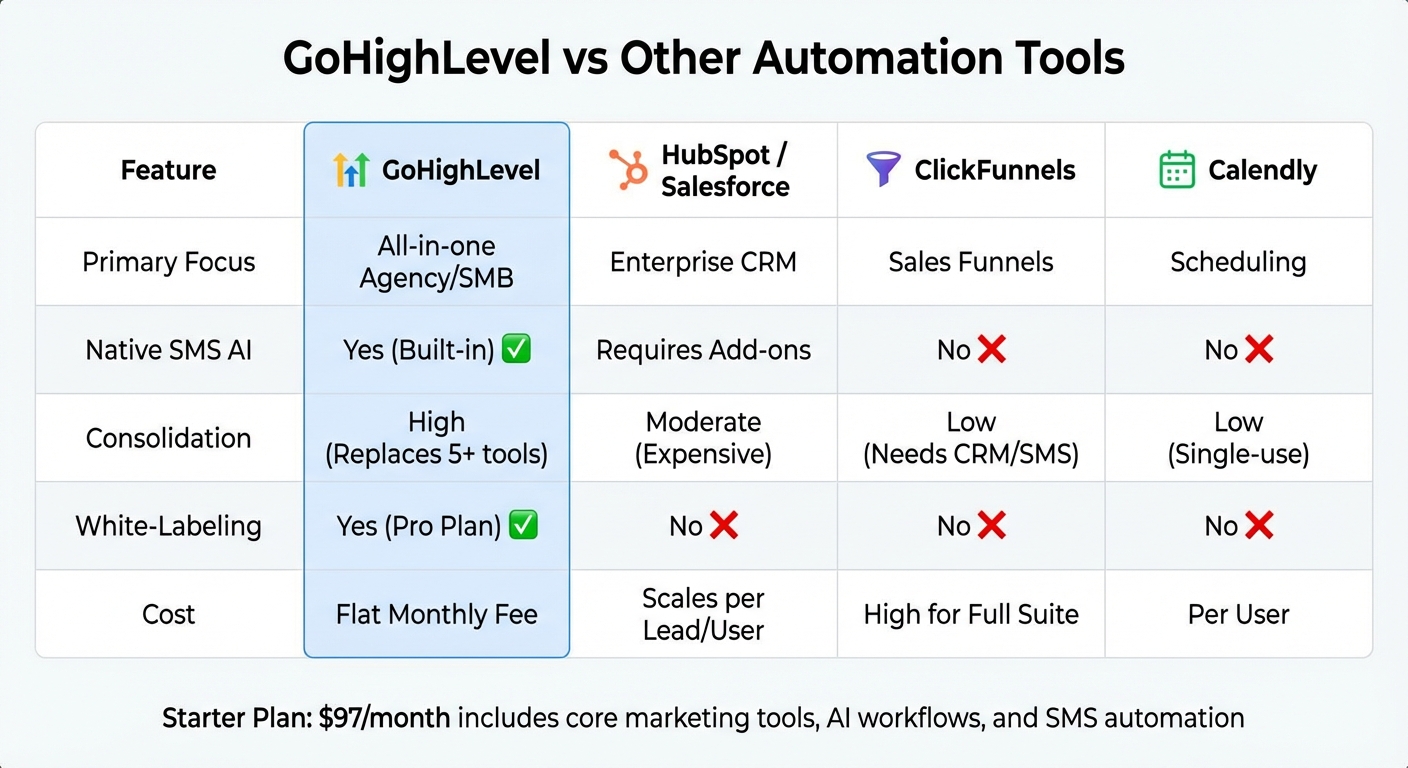
GoHighLevel vs Other Automation Tools Comparison Chart
When exploring tools for automating appointment booking, you've likely come across options like n8n, Make.com, or combinations like Calendly paired with Twilio and a separate CRM. These setups often require juggling multiple subscriptions and third-party integrations, which can lead to delays and potential failures. GoHighLevel simplifies this process by combining CRM, SMS automation, AI agents, and calendar management into a single platform.
But the benefits go beyond just convenience. By keeping your AI booking bot, customer data, and calendar within one system, GoHighLevel eliminates the lag between receiving a lead's text and checking availability. Its built-in AI integration accesses real-time calendar data and schedules appointments directly. This streamlined approach ensures faster responses and reduces technical hiccups, creating a smoother experience for businesses and their clients.
For agencies, GoHighLevel offers another major perk: scalability. Using Snapshots, you can replicate proven AI booking workflows across multiple clients. Whether you're handling five dental clinics or ten home service companies, you can quickly deploy effective systems without starting from scratch each time. Plus, for those on the $497 or $4,970 plans, the platform allows you to resell AI services. For instance, you could charge clients $0.07 per message while your cost is $0.05, turning this feature into a direct profit opportunity.
GoHighLevel vs Other Automation Tools
The key difference between GoHighLevel and other platforms lies in its ability to consolidate tools rather than fragment them. Platforms like HubSpot or Salesforce may offer enterprise-level CRM capabilities, but you'll still need to add SMS features, funnel builders, and scheduling tools separately. ClickFunnels excels at creating landing pages but requires external CRM and SMS integrations, while Calendly handles scheduling but lacks lead qualification or follow-up automation. This is where GoHighLevel stands out - it combines all these functionalities under one roof.
| Feature | GoHighLevel | HubSpot / Salesforce | ClickFunnels | Calendly |
|---|---|---|---|---|
| Primary Focus | All-in-one Agency/SMB | Enterprise CRM | Sales Funnels | Scheduling |
| Native SMS AI | Yes (Built-in) | Requires Add-ons | No | No |
| Consolidation | High (Replaces 5+ tools) | Moderate (Expensive) | Low (Needs CRM/SMS) | Low (Single-use) |
| White-Labeling | Yes (Pro Plan) | No | No | No |
| Cost | Flat Monthly Fee | Scales per Lead/User | High for Full Suite | Per User |
GoHighLevel's Starter Plan, priced at $97/month, includes core marketing tools, AI workflows, and SMS automation, which often costs less than piecing together separate tools, typically ranging from $200–$600 per month. Additionally, it supports multi-channel booking via SMS, Facebook Messenger, Instagram DMs, and Google My Business, ensuring your AI can engage leads wherever they reach out.
The Learning Curve and Long-Term Returns
While GoHighLevel's all-in-one system simplifies operations, learning to navigate its features pays off significantly in the long run. With tools like workflow builders, funnel editors, membership sites, and reputation management, there’s an initial learning curve compared to single-purpose platforms. However, after 2–4 weeks, users typically see clear time and cost savings.
This complexity is the trade-off for having a unified platform. Instead of mastering multiple interfaces - one for CRM, another for email, and yet another for SMS - you focus on learning one powerful system. To ease the process, GoHighLevel offers free training through the GHL Academy and its official YouTube "Platform Overview" series, helping users get up to speed quickly.
Once your workflows are in place, the long-term benefits become evident. Businesses that previously spent hours manually booking appointments or managing various software subscriptions report reduced costs and improved lead conversions. With the platform capable of automating 75% to 80% of inquiries, teams can prioritize high-value tasks instead of repetitive scheduling. For agencies, features like white-labeling and the ability to resell the platform transform GoHighLevel from a cost into a revenue-generating tool.
How to Set Up AI Appointment Booking with GoHighLevel
Setting up AI appointment booking in GoHighLevel involves configuring it at both the agency and sub-account levels. Start by enabling Conversation AI in your Agency Settings, then fine-tune it for each sub-account where you want automated booking to function. Missing any step in this process could result in the bot failing to respond correctly when a customer reaches out via text. Here's a step-by-step guide to help you get everything running smoothly.
Step 1: Configure Your GoHighLevel Account
Begin by setting up your GoHighLevel account. Make sure SMS functionality is enabled. Head to Agency Settings under Company Settings and activate Conversation AI at the agency level. For each sub-account, ensure there's an integrated SMS number and calendar. GoHighLevel supports various communication channels, including SMS, Facebook Messenger, Instagram DMs, and Google My Business.
Step 2: Enable Conversation AI for SMS
Within the sub-account, go to Settings > Conversation AI and switch it to "Auto-Reply" mode. Choose SMS as the supported channel and customize the bot's personality using the "Personality and Additional Instructions" fields. Use the "Customize Bot Responses" section to add FAQs, and define specific qualifying questions in the "Conversation Flow" section. These steps ensure the bot gathers the necessary details before sending a booking link.
Step 3: Set Up Your Booking Calendar
For the AI to book appointments, it needs access to a properly configured calendar. Go to your calendar settings and define available time slots, buffer periods, and blackout dates. Note that the AI booking system only works with standard calendars - recurring calendars are not supported. Use clear, service-specific names for your calendars, like "Dental Consultation" or "Home Inspection Booking", instead of generic labels like "Cal-01." If you offer multiple services, set up a "Fallback Calendar" to handle ambiguous requests.
Decide whether the AI will send a default confirmation message or if you'll add a custom confirmation step to your workflow. Once your calendar is ready, you can move on to designing the AI's response workflows.
Step 4: Create AI Response Workflows
In the Automation section of GoHighLevel, create a new workflow triggered by inbound SMS messages. Add the "Appointment Booking Conversation AI" action and link it to the calendar you configured earlier. Set a limit on the number of messages the AI can send during booking attempts - 15 messages is a good starting point, though the system allows anywhere between 5 and 25 messages.
Incorporate branching logic to handle different scenarios, such as Appointment Booked, Bot Timed Out, and Appointment Not Booked. For the "Time Out" branch, use a "GoTo" action to re-engage the contact with automated follow-ups.
| Workflow Component | Recommended Setting | Purpose |
|---|---|---|
| Max Message Limit | 15 messages | Prevents endless loops and flags stalled conversations |
| Timeout Value | 20–60 minutes | Initiates follow-up actions if the lead goes silent |
| Supported Channels | SMS, FB, IG, GMB | Platforms where the bot can book appointments |
| Calendar Type | Standard (No Recurring) | Ensures compatibility with AI booking workflows |
Step 5: Test and Refine the System
Thorough testing is crucial to ensure your AI booking system runs efficiently. Use the "Test AI Chat" feature to confirm the bot correctly identifies customer details and intent. Send test messages from your own phone to see how the AI handles different scenarios, such as straightforward inquiries, vague requests, or rescheduling. Also, test the system with booking disabled to verify the bot offers manual contact options rather than attempting a false booking.
Check for potential issues with overlapping bookings to avoid calendar conflicts. Use the Conversation AI dashboard to review transcripts and ensure the bot maintains context - usually based on the last 10 messages or an 800-word limit. If you notice the bot struggling with specific questions, update the FAQ section or adjust the conversation flow settings. Keep in mind that each generated message costs $0.020, so monitoring performance can help manage both efficiency and expenses.
sbb-itb-f031672
Examples of AI SMS Appointment Booking in Action
Marketing Agency: Automated Client Onboarding
Marketing agencies often struggle to turn inbound leads into scheduled discovery calls before interest fades. Every missed call can mean lost revenue, as each unanswered call represents a missed opportunity. With GoHighLevel's AI SMS booking system, agencies tackle this problem using the Missed Call Text Back feature. This tool automatically sends a text message with a booking link whenever a call goes unanswered.
Here’s how it works: when a lead responds to the automated text, a customer reply trigger activates the AI bot. The bot then pulls real-time availability from synced calendars, suggests open slots for consultations or marketing audits, and manages the entire conversation in Auto-Pilot Mode. This setup ensures no opportunity slips through the cracks, even outside business hours, without requiring round-the-clock staff.
Agencies using the $497 or $4,970 plans can also generate revenue by rebilling clients for Conversation AI services. For instance, an agency might pay $0.02 per message but charge clients $0.07, earning a $0.05 profit per AI-generated text. While this system simplifies client onboarding for agencies, it also demonstrates how service businesses can leverage AI to streamline scheduling.
Med Spa: Cutting No-Shows with SMS Automation
For med spas, missed appointments can result in significant revenue loss. GoHighLevel's AI booking system helps mitigate this by simplifying the rescheduling process. Clients can text to reschedule, and the AI bot handles the rest - locating the original booking, offering new available dates, and updating the calendar automatically. This eliminates the back-and-forth of phone tag and saves valuable time.
The system also uses Time Out branches in workflows to re-engage clients who drop off mid-conversation. After a set period, the bot follows up to finalize the scheduling process.
Additionally, med spas can enhance the AI agent with a Knowledge Base, allowing the bot to answer common questions about treatment preparation or recovery directly via text. This reduces uncertainty for clients and helps lower no-show rates. These examples highlight how AI-powered SMS booking not only prevents scheduling errors but also optimizes appointment management for service-based businesses.
Conclusion
Key Takeaways
AI-powered appointment booking through text messaging tackles scheduling headaches and operates around the clock, ensuring no lead slips through the cracks. Features like automated reminders and confirmations help reduce no-shows and keep your schedule running smoothly. Plus, by cutting down on human errors like double bookings or missed follow-ups, this system provides a more dependable way to manage appointments. For agencies juggling multiple clients, this scalable solution allows you to handle higher lead volumes without adding extra administrative staff.
The productivity boost is hard to ignore. On average, workers switch between apps about 10 times per hour, which can seriously hurt efficiency. GoHighLevel’s all-in-one platform eliminates this issue. Agencies that adopt this streamlined approach often see their monthly software costs drop by 50–70%, all while improving the quality of their services. By integrating AI-driven scheduling into your workflow, you not only save time but also set the stage for scaling your operations effectively.
Take the Next Step with GoHighLevel
Ready to simplify your scheduling and boost efficiency? GoHighLevel offers a 14-day free trial so you can see the benefits of AI appointment booking firsthand. The Starter Plan starts at just $97 per month.
If you’re currently managing separate tools for CRM, SMS marketing, and scheduling, switching to GoHighLevel can streamline your processes and help you deliver better results for your clients. Why wait? Make the move today!
FAQs
How does GoHighLevel compare to other appointment scheduling tools?
GoHighLevel simplifies the process of managing appointments by embedding AI-powered scheduling directly into its all-in-one CRM. This eliminates the hassle of juggling separate tools like calendars or chatbots. With its Conversation AI, the platform syncs with connected calendars, communicates seamlessly via SMS or social media, and can automatically confirm appointments or flag potential issues. Tools like the Eliza AI bot and Voice AI agent further enhance its capabilities, enabling businesses to handle calls, qualify leads, and schedule appointments in real time. It’s a complete package tailored for agencies and small businesses.
Unlike standalone scheduling tools that often require multiple integrations, GoHighLevel brings messaging, voice, and AI-driven workflows together in one place. This not only reduces complexity but also cuts costs, delivering a better return on investment. While the platform may take some time to master, its extensive features and agency-focused design make it a powerful option for businesses aiming to simplify operations and boost productivity.
How can I set up AI to book appointments through text messages using GoHighLevel?
To set up AI-powered appointment booking in GoHighLevel, here's what you need to do:
- Log in to your GoHighLevel account and navigate to Workflows. Choose to either create a new workflow or edit an existing one.
- Add the Appointment Booking Conversation AI action, also known as the Eliza AI Booking Bot, to the workflow.
- Select a calendar for the AI to use when pulling available time slots. Make sure the chosen calendar is not set to recurring.
- Turn on the booking feature within the action settings and confirm your calendar selection.
- If you'd like, adjust the bot’s tone and instructions to align with your brand’s style and voice.
- Define basic parameters like the maximum number of messages and timeout settings, and ensure SMS is chosen as the communication method.
Once everything is set up, the AI will take care of appointment scheduling via text, sharing available slots and confirming bookings automatically.
Can GoHighLevel's AI booking system be adapted for different industries?
GoHighLevel’s AI booking system offers a high level of customization, making it adaptable to different industries. You can tweak the bot’s tone, prompts, and instructions to incorporate language and workflows specific to your field. This tailored approach ensures the AI aligns seamlessly with your business, creating a smoother customer experience while boosting overall efficiency.